

Overview
Every Instruction on this page is for Linux.
The PlayStation 1 port is currently under development in the Git "main" branch.
If I use the word PSX it is equivalent to the PlayStation 1.
Requirements
GNU BinUtils
Compiler needs GNU Binutils. Download a recent version from https://ftp.gnu.org/gnu/binutils/ . Then run shell commands:
./tar -xf <binutils.tar.gz>
./cd <binutils>
./mkdir build
./cd build
../configure --prefix=/usr/local/mipsel-unknown-elf --target=mipsel-unknown-elf --with-float=soft
make -j$(nproc)
sudo make install
export PATH="/usr/local/mipsel-unknown-elf/bin:$PATH"
Now you can go two ways:
1) Let the binaries as they are and always use the compiler option
-XP/usr/local/mipsel-unknown-elf/bin/mipsel-unknown-elf-2) Create symlinks
sudo ln -s /usr/local/mipsel-unknown-elf/bin/mipsel-unknown-elf-as /usr/bin/mipsel-ps1-as
sudo ln -s /usr/local/mipsel-unknown-elf/bin/mipsel-unknown-elf-ld /usr/bin/mipsel-ps1-ld
sudo ln -s /usr/local/mipsel-unknown-elf/bin/mipsel-unknown-elf-objcopy /usr/bin/mipsel-ps1-objcopy
PSY-Q-SDK
To compile something You need the converted PSY-Q-SDK to the ELF format
You can go two ways:
1) Clone it directly
git clone https://key-real@git.code.sf.net/p/psy-q-sdk-elf/code psy-q-sdk2) Use the original and convert it by your self
- Download the official SDK:
https://psx.arthus.net/sdk/Psy-Q/PSYQ_SDK.zip
- Download the converter:
https://gitlab.com/jype/psyq2elf
from now on I assume the SDK is in following Folder:
~/psy-q-sdkReal Hardware
You need a PlayStation 1 with the MOD CHIP.
Emulator
- I recommend to use PCSX-REDUX https://github.com/grumpycoders/pcsx-redux
(I use Arch Linux and it is in my AUR Repo: pcsx-redux-git)
- DuckStation https://github.com/stenzek/duckstation?tab=readme-ov-file#downloading-and-running
(I use Arch Linux and it is in my AUR Repo: duckstation-git)
- ePSXe https://www.epsxe.com/
(I use Arch Linux and it is in my AUR Repo: epsxe)
PSX BIOS
You can use
a) the original Sony BIOS:
https://gist.github.com/juanbrujo/cf55d223ad01927a48f9ebac9f50bdee
b) OpenBIOS from the PCSX-REDUX project:
https://github.com/grumpycoders/pcsx-redux/tree/main/src/mips/openbios
Building the Compiler
1) Get the newest version of FPC trunk:
git clone https://gitlab.com/freepascal.org/fpc/source.git fpc2) Compile and install the the compiler:
make cleanIf you created the symlinks to the mipsel binutils just do:
sudo make crossinstall OS_TARGET=ps1 CPU_TARGET=mipselIf not do:
sudo make crossinstall OS_TARGET=ps1 CPU_TARGET=mipsel CROSSOPT="-XP/usr/local/mipsel-unknown-elf/bin/mipsel-unknown-elf-"Bare-Metal
You don't have to use the PSY-Q-SDK.
The FPC RTL is configured to go Bare-Metal.
Compile just with:
ppcrossmipsel test.pas -Tps1 -XXOr if You don't have the symlinks:
ppcrossmipsel test.pas -Tps1 -XX -XP/usr/local/mipsel-unknown-elf/bin/mipsel-unknown-elf-By default the Software FPU emulation is turned off. If You need the Software FPU compile with
-CfSOFTSo the minimal Program would be:
{$MODE OBJFPC}
begin

    writeln('HELLO from Bare-Metal');

end.
The RTL will detect whether PCSX-Redux is running and enable debugging extensions such as Debug Writeln and Heap Viewer.
So our Spinnig Cube example is:
{$mode objfpc}{$H+}
uses
  ps1GPU, ps1System, ps1GTE, ps1COP0;

const
  sintable : array [0..359] of longint = (
0,71,143,214,286,357,428,499,570,641,711,782,852,921,991,1060,1129,1198,1266,1334,1401,1468,1534,1600,1666,
1731,1796,1860,1923,1986,2048,2110,2171,2231,2290,2349,2408,2465,2522,2578,2633,2687,2741,2793,2845,2896,2946,2996,3044,
3091,3138,3183,3228,3271,3314,3355,3396,3435,3474,3511,3547,3582,3617,3650,3681,3712,3742,3770,3798,3824,3849,3873,3896,
3917,3937,3956,3974,3991,4006,4021,4034,4046,4056,4065,4074,4080,4086,4090,4094,4095,4096,4095,4094,4090,4086,4080,4074,
4065,4056,4046,4034,4021,4006,3991,3974,3956,3937,3917,3896,3873,3849,3824,3798,3770,3742,3712,3681,3650,3617,3582,3547,
3511,3474,3435,3396,3355,3314,3271,3228,3183,3138,3091,3044,2996,2946,2896,2845,2793,2741,2687,2633,2578,2522,2465,2408,
2349,2290,2231,2171,2110,2048,1986,1923,1860,1796,1731,1666,1600,1534,1468,1401,1334,1266,1198,1129,1060,991,921,852,
782,711,641,570,499,428,357,286,214,143,71,0,-71,-143,-214,-286,-357,-428,-499,-570,-641,-711,-782,-852,
-921,-991,-1060,-1129,-1198,-1266,-1334,-1401,-1468,-1534,-1600,-1666,-1731,-1796,-1860,-1923,-1986,-2048,-2110,-2171,-2231,-2290,-2349,-2408,
-2465,-2522,-2578,-2633,-2687,-2741,-2793,-2845,-2896,-2946,-2996,-3044,-3091,-3138,-3183,-3228,-3271,-3314,-3355,-3396,-3435,-3474,-3511,-3547,
-3582,-3617,-3650,-3681,-3712,-3742,-3770,-3798,-3824,-3849,-3873,-3896,-3917,-3937,-3956,-3974,-3991,-4006,-4021,-4034,-4046,-4056,-4065,-4074,
-4080,-4086,-4090,-4094,-4095,-4096,-4095,-4094,-4090,-4086,-4080,-4074,-4065,-4056,-4046,-4034,-4021,-4006,-3991,-3974,-3956,-3937,-3917,-3896,
-3873,-3849,-3824,-3798,-3770,-3742,-3712,-3681,-3650,-3617,-3582,-3547,-3511,-3474,-3435,-3396,-3355,-3314,-3271,-3228,-3183,-3138,-3091,-3044,
-2996,-2946,-2896,-2845,-2793,-2741,-2687,-2633,-2578,-2522,-2465,-2408,-2349,-2290,-2231,-2171,-2110,-2048,-1986,-1923,-1860,-1796,-1731,-1666,
-1600,-1534,-1468,-1401,-1334,-1266,-1198,-1129,-1060,-991,-921,-852,-782,-711,-641,-570,-499,-428,-357,-286,-214,-143,-71);


function isin(x: Int32): Int32;
begin
  result:= sintable[x mod 359];
end;


function icos(x: Int32): Int32;
begin
  result:= SinTable[(90 + x) mod 359];
end;

const
  SCREEN_WIDTH = 320;
  SCREEN_HEIGHT = 240;
  ONE = 4094;


type
  TFace = record
    vertices: array[0..3] of smallint;
    color: LongWord;
  end;
  PFace = ^TFace;


const
  NUM_CUBE_VERTICES = 8;
  NUM_CUBE_FACES    = 6;

  cubeVertices: array[0..NUM_CUBE_VERTICES - 1] of GTEVector16 = (
    (x:-32; y:-32; z:-32),
    (x: 32; y:-32; z:-32),
    (x:-32; y: 32; z:-32),
    (x: 32; y: 32; z:-32),
    (x:-32; y:-32; z: 32),
    (x: 32; y:-32; z: 32),
    (x:-32; y: 32; z: 32),
    (x: 32; y: 32; z: 32)
  );

  cubeFaces: array[0..NUM_CUBE_FACES - 1] of TFace = (
    (vertices:(0, 1, 2, 3); color: $0000FF),
    (vertices:(6, 7, 4, 5); color: $00FF00),
    (vertices:(4, 5, 0, 1); color: $00FFFF),
    (vertices:(7, 6, 3, 2); color: $FF0000),
    (vertices:(6, 4, 2, 0); color: $FF00FF),
    (vertices:(5, 7, 1, 3); color: $FFFF00)
  );


procedure multiplyCurrentMatrixByVectors(var output: GTEMatrix);
begin
  // multiply current GTE rotation matrix by column vectors V0/V1/V2
  gte_Command(GTE_CMD_MVMVA or GTE_SF or GTE_MX_RT or GTE_V_V0 or GTE_CV_NONE);
  output.m[0,0]:= smallint(gte_getDataRegIR1);
  output.m[1,0]:= smallint(gte_getDataRegIR2);
  output.m[2,0]:= smallint(gte_getDataRegIR3);

  gte_Command(GTE_CMD_MVMVA or GTE_SF or GTE_MX_RT or GTE_V_V1 or GTE_CV_NONE);
  output.m[0,1]:= smallint(gte_getDataRegIR1);
  output.m[1,1]:= smallint(gte_getDataRegIR2);
  output.m[2,1]:= smallint(gte_getDataRegIR3);

  gte_Command(GTE_CMD_MVMVA or GTE_SF or GTE_MX_RT or GTE_V_V2 or GTE_CV_NONE);
  output.m[0,2]:= smallint(gte_getDataRegIR1);
  output.m[1,2]:= smallint(gte_getDataRegIR2);
  output.m[2,2]:= smallint(gte_getDataRegIR3);
end;


procedure rotateCurrentMatrix(yaw, pitch, roll: longint);
var
  multiplied : GTEMatrix;
  s, c: longint;

begin

  if yaw <> 0 then begin

    s := isin(yaw);
    c := icos(yaw);

    gte_setColumnVectors(c, -s,   0,
                         s,  c,   0,
                         0,  0, ONE);
    multiplyCurrentMatrixByVectors(multiplied);
    gte_loadRotationMatrix(@multiplied);

  end;

  if pitch <> 0 then begin

    s := isin(pitch);
    c := icos(pitch);

    gte_setColumnVectors( c,   0, s,
                          0, ONE, 0,
                         -s,   0, c);
    multiplyCurrentMatrixByVectors(multiplied);
    gte_loadRotationMatrix(@multiplied);

  end;

  if roll <> 0 then begin

    s:= isin(roll);
    c:= icos(roll);

    gte_setColumnVectors(ONE, 0,  0,
                           0, c, -s,
                           0, s,  c);

    multiplyCurrentMatrixByVectors(multiplied);
    gte_loadRotationMatrix(@multiplied);

  end;
end;


var

  usingSecondFrame : Boolean = False;
  bufferX, bufferY : LongInt;
  chain : ^DMAChain;
  ptr : PLongWord;

  zIndex : LongInt;

  i : longint;
  face : PFace;
  xy0 : longint;

begin

  setupGPU(GP1_MODE_NTSC, SCREEN_WIDTH, SCREEN_HEIGHT);
  setupChainOT(1024 * 2, 1024);
  setupGTE(SCREEN_WIDTH, SCREEN_HEIGHT);

  while true do begin

    if usingSecondFrame then bufferX:= SCREEN_WIDTH else bufferX:= 0;
    bufferY:= 0;

    chain:= @dmaChains[Ord(usingSecondFrame)];
    usingSecondFrame:= not usingSecondFrame;

    GPU_GP1:= gp1_fbOffset(bufferX, bufferY);

    clearOrderingTable(chain^.orderingTable, ORDERING_TABLE_SIZE);
    chain^.nextPacket:= @chain^.data[0];

    // Reset translation vector and rotation matrix
    gte_setControlRegTRX(0);
    gte_setControlRegTRY(0);
    gte_setControlRegTRZ(180);

    gte_setRotationMatrix(ONE, 0, 0,
                          0, ONE, 0,
                          0, 0, ONE);

    // Rotate cube according to frame counter
    rotateCurrentMatrix(0, vblankCount, vblankCount);

    for i:= 0 to NUM_CUBE_FACES - 1 do begin

      face:= @cubeFaces[i];

      // Apply perspective projection to first 3 vertices
      gte_loadV0(@cubeVertices[face^.vertices[0]]);
      gte_loadV1(@cubeVertices[face^.vertices[1]]);
      gte_loadV2(@cubeVertices[face^.vertices[2]]);
      gte_Command(GTE_CMD_RTPT or GTE_SF);

      // Determine if face is visible
      gte_Command(GTE_CMD_NCLIP);
      if gte_getDataRegMAC0 <= 0 then continue;

      // Save first vertex coordinates
      xy0:= gte_getDataRegSXY0;

      // Apply perspective to last vertex
      gte_loadV0(@cubeVertices[face^.vertices[3]]);
      gte_Command(GTE_CMD_RTPS or GTE_SF);

      // Calculate average Z for ordering table
      gte_Command(GTE_CMD_AVSZ4 or GTE_SF);
      zIndex:= gte_getDataRegOTZ;

      if (zIndex < 0) or (zIndex >= ORDERING_TABLE_SIZE) then Continue;

      // Allocate GPU packet and store quad
      ptr:= allocatePacket(chain^, zIndex, 5);
      ptr[0]:= face^.color or gp0_shadedQuad(False, False, False);
      ptr[1]:= xy0;
      gte_storeDataRegSXY0(2 * 4, ptr);
      gte_storeDataRegSXY1(3 * 4, ptr);
      gte_storeDataRegSXY2(4 * 4, ptr);

    end;


    // Fill VRAM background
    ptr:= allocatePacket(chain^, ORDERING_TABLE_SIZE - 1, 3);
    ptr[0]:= gp0_rgb(64, 64, 64) or gp0_vramFill();
    ptr[1]:= gp0_xy(bufferX, bufferY);
    ptr[2]:= gp0_xy(SCREEN_WIDTH, SCREEN_HEIGHT);

    // Swap buffers
    ptr:= allocatePacket(chain^, ORDERING_TABLE_SIZE - 1, 4);
    ptr[0]:= gp0_texpage(0, True, False);
    ptr[1]:= gp0_fbOffset1(bufferX, bufferY);
    ptr[2]:= gp0_fbOffset2(bufferX + SCREEN_WIDTH  - 1, bufferY + SCREEN_HEIGHT - 2);
    ptr[3]:= gp0_fbOrigin(bufferX, bufferY);

    waitForGP0Ready();
    waitForVSync();
    sendLinkedList(@(chain^.orderingTable[ORDERING_TABLE_SIZE - 1]));

  end;

end.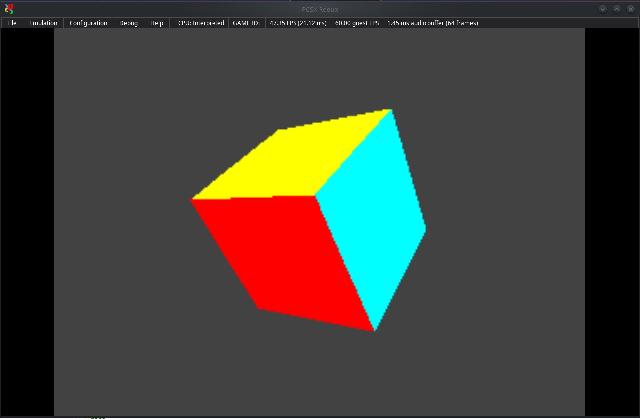
for more examples see: https://sourceforge.net/p/ps1-bare-metal-examples/code/ci/master/tree/
Compiling programs uses PSY-Q-SDK
When compiling programs, you should always enable smartlinking by adding an option to the compiler:
-XXand you have to specify the path to the PSY-Q-SDK (here in your /home folder):
-Fl~/psy-q-sdkso your compile command should look like this:
ppcrossmipsel test.pas -Tps1 -XX -Fl~/psy-q-sdkor if you have no symlinks to binutils:
ppcrossmipsel test.pas -Tps1 -XX -Fl~/psy-q-sdk -XP/usr/local/mipsel-unknown-elf/bin/mipsel-unknown-elf-Hello World example
{$MODE OBJFPC}
uses libstd;
begin

    printf('HELLO from FPC'#10);

end.
Here's what this program produces in the PCSX-Redux emulator when You switch MainMenu->Debug->Show Logs:
HELLO from FPCCube example
{$MODE OBJFPC}
uses libstd, libetc, libgpu, libgte;

const
    MODE_NTSC = 0;
    MODE_PAL = 1;

    OTSIZE = 4096;									// Ordering table size

    vertices : array [0..7] of SVECTOR = (			// Cube
      (vx: -128; vy: -128; vz: -128; pad: 0 ),
      (vx:  128; vy: -128; vz: -128; pad: 0 ),
      (vx:  128; vy: -128; vz:  128; pad: 0 ),
      (vx: -128; vy: -128; vz:  128; pad: 0 ),
      (vx: -128; vy:  128; vz: -128; pad: 0 ),
      (vx:  128; vy:  128; vz: -128; pad: 0 ),
      (vx:  128; vy:  128; vz:  128; pad: 0 ),
      (vx: -128; vy:  128; vz:  128; pad: 0 ));

    faces : array [0..35] of smallint = (			// Cube
      0, 3, 2, // top
      0, 2, 1, // top
      4, 0, 1, // front
      4, 1, 5, // front
      7, 4, 5, // bottom
      7, 5, 6, // bottom
      5, 1, 2, // right
      5, 2, 6, // right
      2, 3, 7, // back
      2, 7, 6, // back
      0, 4, 7, // left
      0, 7, 3  // left
      );


type

    DoubleBuff = packed record						// Screen
        draw : DRAWENV;
        disp : DISPENV;
        ot : array[0..OTSIZE] of dword;				// Ordering table
    end;


var

    screen : array [0..1] of DoubleBuff;           	// Struct to hold the display & draw buffers
    currbuff : byte;            					// Holds the current buffer number (0 or 1)

    i : longint;
    otz : longint;									// Current Ordering table Entry

    poly : array [0..11] of POLY_G3;				// Cube

    rotation : SVECTOR;
    translation : VECTOR;
    transform : MATRIX;

    p : pointer;
    flg : pointer;
    nclip : longint;								// Is cliped?


procedure setRGB0(var c: DRAWENV; r, g, b: byte);
begin
    c.r0:=r;
    c.g0:=g;
    c.b0:=b;
end;


procedure ScreenInit(width, height: dword);
var
    mode : byte;

begin

    // Init
    ResetGraph(0);
    InitGeom();

    SetGraphDebug(0);

    // Set Display Mode
    if height = 240 then mode:= MODE_NTSC;
    if height = 256 then mode:= MODE_PAL;
    SetVideoMode(mode);

    // Init Buffers
    SetDefDispEnv(@screen[0].disp, 0, 0, width, height);
    SetDefDispEnv(@screen[1].disp, 0, height, width, height);

    SetDefDrawEnv(@screen[0].draw, 0, height, width, height);
    SetDefDrawEnv(@screen[1].draw, 0, 0, width, height);

    // Set screen Offset
    screen[0].disp.screen.x:= 0;
    screen[0].disp.screen.y:= 0;
    screen[1].disp.screen.x:= 0;
    screen[1].disp.screen.y:= 0;

    screen[0].disp.screen.h:= height;
    screen[0].disp.screen.w:= 0;
    screen[1].disp.screen.h:= height;
    screen[1].disp.screen.w:= 0;

    // Enable background clearing
    screen[0].draw.isbg:= 1;
    screen[1].draw.isbg:= 1;

    // Set the background clear color
    setRGB0(screen[0].draw, 0, 0, 0);
    setRGB0(screen[1].draw, 0, 0, 0);


    // Initialize and setup the GTE geometry offsets
    SetGeomOffset(width div 2, height div 2);
    SetGeomScreen(100);

    SetDispMask(1);

    // Set the current initial buffer
    currbuff:= 0;
    PutDispEnv(@screen[currbuff].disp);
    PutDrawEnv(@screen[currbuff].draw);

end;


procedure DisplayFrame;
begin

    // Set the current display & draw buffers
    PutDispEnv(@screen[currbuff].disp);
    PutDrawEnv(@screen[currbuff].draw);

    // Draw Primetive
    DrawOTag(@screen[currbuff].ot[OTSIZE - 1]);

    // Draw Font
    FntFlush(-1);

    if currbuff = 0 then currbuff:= 1 else currbuff:= 0;

    // Sync and wait for vertical blank
    DrawSync(0);
    VSync(0);

end;


begin

    ScreenInit(320, 256);

    // Setup Font
    FntLoad(960, 256);
    SetDumpFnt(FntOpen(0, 100, 200, 200, 0, 512));

    rotation.vx:= 0;
    rotation.vy:= 0;
    rotation.vz:= 0;

    translation.vx:= 0;
    translation.vy:= 0;
    translation.vz:= 500;

    repeat

        // Clear Ordering table
        ClearOTagR(@screen[currbuff].ot[currbuff], OTSIZE);

        // Transform
        rotation.vx +=  6;
        rotation.vy +=  8;
        rotation.vz += 12;

        RotMatrix(@rotation, @transform);
        TransMatrix(@transform, @translation);

        SetRotMatrix(@transform);
        SetTransMatrix(@transform);

        // Draw Polys
        for i:= 0 to 11 do begin
            setPolyG3(@poly[i]);

            poly[i].r0:= 255; poly[i].g0:=0;   poly[i].b0:= 0;
            poly[i].r1:= 0;   poly[i].g1:=255; poly[i].b1:= 0;
            poly[i].r2:= 0;   poly[i].g2:=0;   poly[i].b2:= 255;

            nclip:= RotAverageNclip3(@vertices[faces[i * 3 + 0]], @vertices[faces[i * 3 + 1]], @vertices[faces[i * 3 + 2]], @poly[i].x0, @poly[i].x1, @poly[i].x2, @p, @otz, @flg);
            if nclip <= 0 then continue;

            if (otz > 0) and (otz < OTSIZE) then addPrim(@screen[currbuff].ot[otz], @poly[i]);
        end;


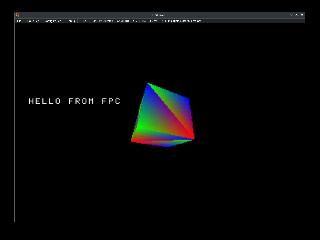
        FntPrint('Hello from FPC');

        DisplayFrame;

    until false;

end.
Here's what this program produces in the PCSX-Redux emulator:
Create a PSX .iso
You need:
https://github.com/Lameguy64/mkpsxiso
and run:
mkpsxiso iso.xml File iso.xml:
<?xml version="1.0" encoding="UTF-8"?>
 <iso_project image_name="myimage.iso" cue_sheet="myimage.cue">
  <track type="data">
   <identifiers system="PLAYSTATION" application="PLAYSTATION" volume="MYDISC" volume_set="MYDISC" publisher="MYPUBLISHER" data_preparer="MKPSXISO"/>
   <directory_tree>
    <file name="system.cnf" type="data" source="system.cnf"/>
    <file name="MAIN.PSX-EXE" type="data" source="test.psx-exe"/>
   </directory_tree>
  </track>
 </iso_project>
File system.cnf:
BOOT=cdrom:\MAIN.PSX-EXE;1
TCB=4
EVENT=10
STACK=801FFFF0
this file describes the boot process.
Information Sources
- full specification: https://psx-spx.consoledev.net/
- Psy-Q-SDK reference doc: https://psx.arthus.net/sdk/Psy-Q/DOCS/LibRef47.pdf
- MIPS Assembly: https://www.cs.unibo.it/~solmi/teaching/arch_2002-2003/AssemblyLanguageProgDoc.pdf
- Cool Course: https://pikuma.com/courses/ps1-programming-mips-assembly-language
- Discord Server: PSX.Dev https://discord.com/invite/psx-dev-642647820683444236