Important
You must setup the debugger and start the project to debug it. Only then this window will be useful.
Breakpoint list
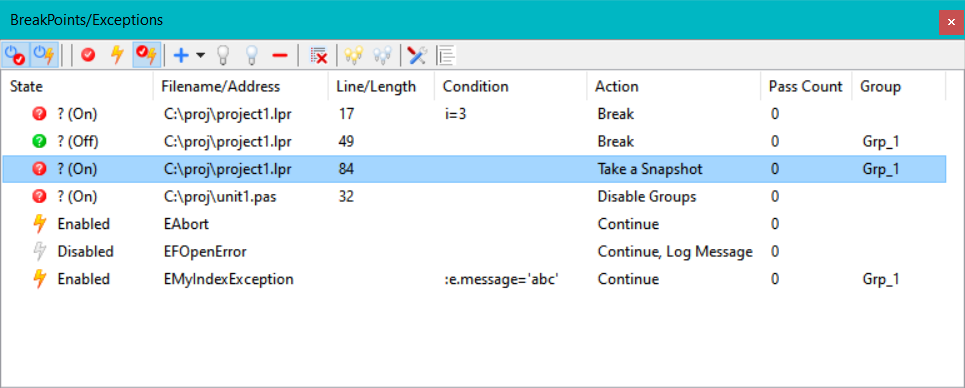
There are 3 kind of breakpoints:
- Source Breakpoint
- Specified by Unit-name and Line-number. The execution will be interrupted before the pascal statement on the specified line is executed. Can be set by clicking the gutter in the source-editor.
- Address Breakpoint
- Specified by an address. The execution will be interrupted before the assembler statement at the address is executed. Can be set by clicking the gutter in disassembler window.
- Data/Watch Breakpoint
- Specified by the name of a variable. The execution will be interrupted when the variable is changed. It can also detect read access. Support for this depends on the platform used.
Data displayed
- State
-
A breakpoint can be enabled or disabled. If it is enabled, then each time the program reaches the breakpoint, the condition is checked and if results true, the action(s) set for the breakpoint will be performed.
- Filename/Address Line/Length
-
Depending on the type of the breakpoint the following is displayed:
- Source Breakpoint:
Filename/Address: The name of the file where the breakpoint is set.
Line/Length: The line-number where the breakpoint is set. - Address Breakpoint:
Filename/Address The address of the breakpoint. This type of breakpoint is useful if there is no source available.
Line/Length: This is empty - Data Breakpoint:
Filename/Address: The name of the variable.
Line/Length: Will show the scope ("Global" / "Declaration") and the mode ("Read" / "Write" / "Read/Write")
- Source Breakpoint:
- Condition
-
Normally a reached breakpoint performs the break action(s). When a condition is defined, this condition is evaluated. If this condition evaluates to True, the break action(s) are performed.
- Action
-
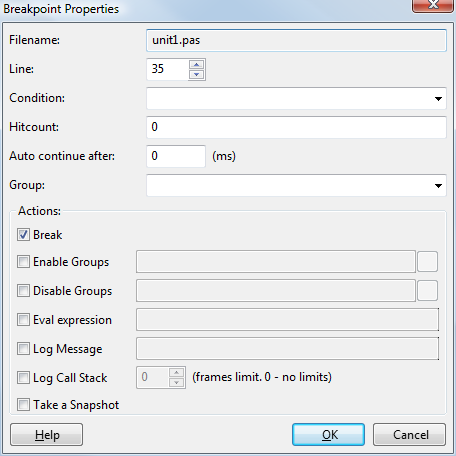
The following actions are available: Break, Enable/Disable group(s), Log message, Evaluate expression, Ignore/Handle Exceptions. A complete description of these actions can be found on the Breakpoint properties page.
- Pass Count
-
How many times the enabled breakpoint has been reached. If a "Hitcount" is defined for this breakpoint, the debugger will perform the break action(s) when the hitcount is reached.
- Group
-
The group where this breakpoint belongs to. This allows to quickly enabled/disable several breakpoints at once.
Interface
Context menu
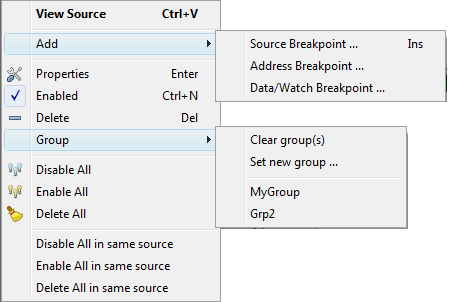
Show AddSource Breakpoint
Address Breakpoint
Data Breakpoint Enable/Disable DeleteEnable allDisable allDelete allEnable all in same sourceDisable all in same sourceDelete all in same sourceBreakpoint properties