

Overview
This tutorial is about getting, installing and using Zeoslib with Lazarus and FPC. The Zeos team has recently made a new forum. Please visit the new forum for more information about ZeosLib and to ask/answer questions about using Zeos and report bugs. The new forum can be found here Forum for ZeosLib.
Getting Zeos
Zeos has recently been ported to Lazarus and there are no releases yet that officially support it but you can easily get it from SVN if you follow these steps:
Windows
- get a SVN client TortoiseSVN and install
- see Getting Started with TortoiseSVN
- do Checkout from Windows Explorer: svn://zeos.firmos.at/zeos/trunk
Linux/BSD
- get a SVN client (esvn, kdesvn, etc.)
- create zeosdbo directory, go in that directory and do
- svn checkout svn://zeos.firmos.at/zeos/trunk
Installing the components
This is a tricky part so you should have a little patience and read this part carefully.
- Make sure you have the latest Lazarus snapshot and the at least FPC 2.0.3 not older than 6th March 2006.
- Start one instance of Lazarus.
- Use Components/Open Package File(.lpk) from the main menu.
- Go to zeosdbo_rework\packages\lazarus\ and open zcomponent.lpk
- Press [Compile] only if you don't want to install the components into the IDE
- Press [Install]
- You are asked if you want to recompile Lazarus.
- Answer [Yes] this time.
- Wait until compilation ends, Lazarus should restart itself after that.
- If all is ok you should now be able to see the [Zeos Access] tab in the Component Palette.

If you receive the error "Cannot find unit ZClasses" or something similar, then you need to carefully check the case of the filenames in your Zeos source distribution.
- Even if the cases match exactly, the autogenerated package source file can generate the wrong case name in the uses clause (Lazarus 0.9.18), i.e.:
<delphi>{ This file was automatically created by Lazarus. Do not edit!
This source is only used to compile and install the package.} unit Zcore; interface uses
 Zclasses, Zcollections, Zcompatibility, Zexprparser, Zexprtoken, Zexpression,
 Zfunctions, Zmatchpattern, Zmessages, Zsysutils, Ztokenizer, Zvariables,
 Zvariant;
implementation end.</delphi>
- Notice that Lazarus has named the unit ZClasses Zclasses, resulting in a naming conflict. Presumably this is a bug in Lazarus, not the Zeos packages. One way around this is to rename all the zeos source files to lowercase. Trawl through each subdirectory under src/ and execute this command in a bash window:
rename -v 'y/A-Z/a-z/' *- Then, in Lazarus, reopen the package (.lpk) and fix the filename cases by clicking on "More..."/"Fix Files Case"
- The package should compile now.
Comments
Currently Zeos CVS for Lazarus has broken packages. Some comments from IgD:
Using a fresh install of Laz 0.9.12 (latest stable version) I was able to install ZeosLib dated 13 Oct 05. First fix the following bugs in ZeosLib:
- 1. Change ZplainPostgreSql81.pas to ZPlainPostgresSql8x.pas in zplain.lpk
<Item22>
  <Filename Value="../../src/plain/ZPlainPostgreSql81.pas"/>
  <UnitName Value="ZPlainPostgreSql8x"/>
</Item22>- 2. Fix the following typos in zdbc.lpk:
a. Remove extra "/" from "build/" (remove the one that is inside the quotes)
<SearchPaths>
  <OtherUnitFiles Value="../../src/dbc/"/>
  <UnitOutputDirectory Value="build/"/>
</SearchPaths>
b. Add missing quote to unitname value
<Item43>
  <Filename Value="../../src/dbc/ZDbcASA.pas"/>
  <UnitName Value="ZDbcASA/>
</Item43>
Now, here are the installation instructions:
Before Lazarus 0.9.13 you must open each of the zeos packages via Components/Open Package File in the following order:
- zcore.lpk
- zparsesql.lpk
- zplain.lpk
- zdbc.lpk
Then finally open zcomponent.lpk and compile and install this package. 0.9.13 can simply open zcomponent.lpk. The IDE will open the rest automatically.
Note: The first four packages only need to be compiled and cannot be installed.
--Forest 17:41, 2 Nov 2005 (CET)
- 3. If you compile and install with sucessfull Zeos, but Lazarus, after rebuilded, start with:
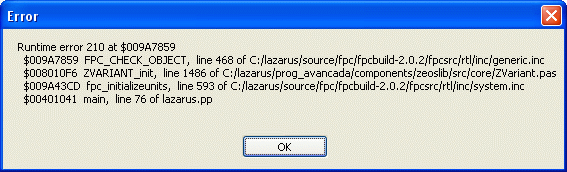
Then you can do:
In Zeos.Inc file replace, in section "// Settings for Debug mode": {$R-} to {$R+}
--Junior 19:48, 15 Apr 2006 (GMT)
Make your first Zeos application
- Drop a ZConnection.
- Set your User, Password, Host, Port and Protocol (and any other params if needed).
- Set Connected to True.
- Drop a ZQuery (do not mistake with ZReadOnlyQuery).
- Set the Connection to your active ZConnection.
- Set the Sql property to something like SELECT * FROM MyTable
- Set Active to True.
- Drop a DataSource from the [Data Access] tab.
- Set the DataSet to your active ZQuery.
- Drop a DBGrid from the [Data Controls] tab.
- Set the Datasource to your DataSource.
- If all is ok you should now be able to see the records from your table.
More information about working with Zeos
Here you can find some really useful articles explaining Zeos usage and it's internals, some of them also talk about Delphi specific stuff but mostly the same techniques can be used in Lazarus too.
- The ZeosLib DBOs 6.1.5 - With Delphi 7 and Firebird 1.5
- Overview of the Zeos Database Objects Architecture
- An Introduction To ZDBC API
- Also check the Downloads section for real examples wich can be easily ported to Lazarus.
Please complete me :)
Possible Bugs and Issues
- I have noticed that somethimes when building Lazarus it cannot find some Zeos files, as a quick workaround try this:
- Use Components/Package Graph from the main menu.
- Open the ZComponent package.
- Right Click on the Files item in the list.
- Choose [Recompile all required].
- When asked "Re-Compile this and all required packages?" answer [Yes].
- Recompile Lazarus normally (with packages).
- There is a bug in FPC's AnsiStrComp wich causes unreliable PChar comparison, this is obvious when using a DBGrid to edit data, AnsiStrComp('abc', 'abcd') can't detect them as being different but it detects AnsiStrComp('abd', 'abcd') ignoring multiple chars from the second string. This bug was found by Jesusrmx. It will probably be fixed soon, see Bug Report.
- Trying to compile revision 903 of ZeosDBO trunk on GNU/Linux amd64 x86_64 gives errors on ZClasses.pas file like:
- Error: No matching Implementation for interface method "IUnknown.QueryInterface (constref TGuid, out <Formal type>) LongInt; Cdecl;"
- The problem is due to changes in FPC related to compatibility between platforms (http://wiki.freepascal.org/User_Changes_Trunk#IInterface.QueryInterface.2C_._AddRef_and_._Release_definitions_have_been_changed)
- and the solution is to edit the ZClasses.pas file as the following patch:
-    function QueryInterface({$IFDEF FPC_HAS_CONSTREF}constref{$ELSE}const{$ENDIF} IID: TGUID; out Obj): HResult; {$IFNDEF WINDOWS}cdecl{$ELSE}stdcall{$ENDIF}; virtual;
-    function _AddRef: Integer; {$IFNDEF WINDOWS}cdecl{$ELSE}stdcall{$ENDIF};
-    function _Release: Integer; {$IFNDEF WINDOWS}cdecl{$ELSE}stdcall{$ENDIF};
+    function QueryInterface({$IFDEF FPC_HAS_CONSTREF}constref{$ELSE}const{$ENDIF} IID: TGUID; out Obj): HResult; {$IF (not defined(WINDOWS)) AND (FPC_FULLVERSION>=20501)}cdecl{$ELSE}stdcall{$IFEND}; virtual;
+    function _AddRef: Integer; {$IF (not defined(WINDOWS)) AND (FPC_FULLVERSION>=20501)}cdecl{$ELSE}stdcall{$IFEND};
+    function _Release: Integer; {$IF (not defined(WINDOWS)) AND (FPC_FULLVERSION>=20501)}cdecl{$ELSE}stdcall{$IFEND};
  public
    constructor Create(const Controller: IInterface);
    property Controller: IInterface read GetController;
@@ -89,7 +93,8 @@
  TContainedObject = class(TAggregatedObject, IInterface)
  protected
-    function QueryInterface({$IFDEF FPC_HAS_CONSTREF}constref{$ELSE}const{$ENDIF} IID: TGUID; out Obj): HResult; {$IFNDEF WINDOWS}cdecl{$ELSE}stdcall{$ENDIF}; override;
+    function QueryInterface({$IFDEF FPC_HAS_CONSTREF}constref{$ELSE}const{$ENDIF} IID: TGUID; out Obj): HResult; {$IF (not defined(WINDOWS)) AND (FPC_FULLVERSION>=20501)}cdecl{$ELSE}stdcall{$IFEND}; override;
  end;
  {$ENDIF}
@@ -221,7 +226,8 @@
  Result := IInterface(FController)._AddRef;
end;
-function TAggregatedObject._Release: Integer; {$IFNDEF WINDOWS}cdecl{$ELSE}stdcall{$ENDIF};
+function TAggregatedObject._Release: Integer; {$IF (not defined(WINDOWS)) AND (FPC_FULLVERSION>=20501)}cdecl{$ELSE}stdcall{$IFEND};