fpGUI is a Object Pascal toolkit for cross-platform application development. It provides single-source portability across Linux, MS Windows, *BSD, Solaris/OpenSolaris, ReactOS and embedded devices like Embedded Linux and Windows CE. fpGUI Toolkit can be used for Open Source and Commercial applications.
fpGUI is a widgetset completely written in Object Pascal. It links directly with the underlying windowing system (Xlib, GDI), and thus avoids the need for many large external libraries (eg: Qt, GTK etc). The main design goal is to get a consistent look and behavior across platforms.
Latest released version: v1.2 (2014-08-20)
For more information, see the fpGUI Toolkit website at:
fpGUI is on GitHub too:
Last stable version =>
Last trunk/develop version (very stable too) =>
Install fpGUI:
Go to fpgui site:
Last stable version =>
Last trunk/develop version (very stable too) =>
-Click on Download ZIP button, on right side...
-Unzip it.
Install fpGUI for Lazarus users:
Load Lazarus: =>
- in Package, => Open Package (.lpk)
Choose:
- for Windows : /directory_of_fpGUI/src/corelib/gdi/fpgui_toolkit.lpk
- for Linux : /directory_of_fpGUI/src/corelib/x11/fpgui_toolkit.lpk
Compile the package.
Now you may compile pure fpGUI application with Lazarus.
See also
License
fpGUI uses the LGPL v2 license with a static linking exception - the same as the Free Pascal Compiler's RTL.
Screenshots
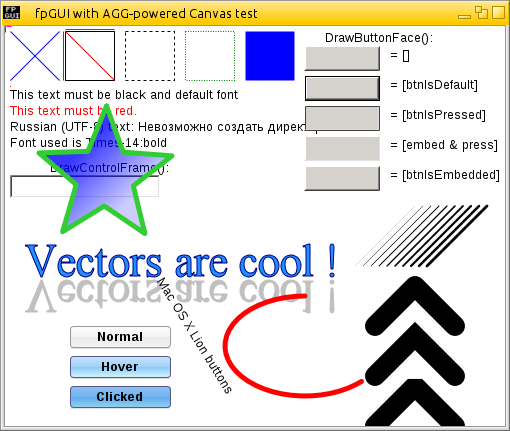
This is a small sample of what the fpGUI Toolkit's new 2D graphics engine can do. Full sub-pixel accuracy, anti-aliased line drawing, anti-aliased text, alpha blending, fully customisable gradient and dash-line generator, gamma support etc. The 2D graphics engine is also fully implemented in Pascal, so no external libraries are required, and makes it very portable to other platforms.