

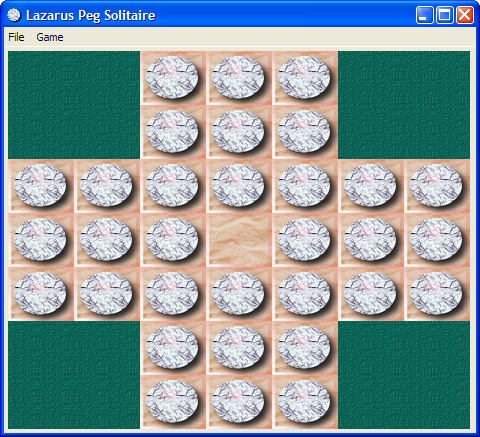
This tutorial is the second Lazarus tutorial that aims at introducing the basics of Lazarus application development. It's best to start this tutorial after having finished the first one (Howdy_World_(Hello_World_on_steroids)). This tutorial exlpains a bit about how to work with graphics and how to make a program modular. The final product of this tutorial is a basic but working version of the Peg Solitaire game (http://en.wikipedia.org/wiki/Peg_solitaire). If all goes well in the end it will look something like this:
Start the project
As mentioned in the previous tutorial it's best to start with a clean, separate directory for each project. A quick recap:
- Create a new directory for this game.
- Start a new Application (Project/New Project... and select Application).
- In the project options insert bin\ in front of the target filename.
- Save the project as PegSolitaire.
- Save the main form as ufrmMain.
- In the object inspector change the form's name to frmMain.
- Change the caption to Lazarus Peg Solitaire.
And extra for this project:
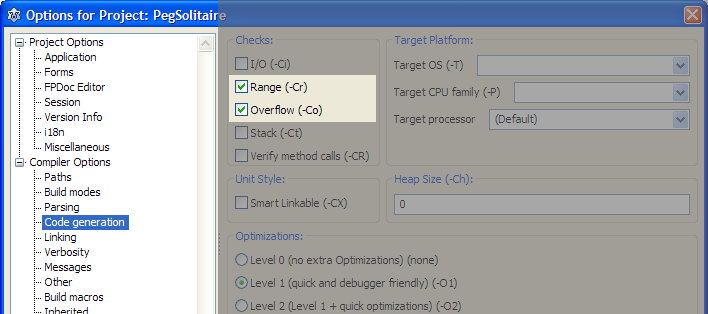
- Open the project options dialog (Shift-Ctrl-F11).
- Select Compiler Options/Code Generation.
- Enable Range checking and Overflow error checking (see image belows).
First steps
It's always a good idea to seperate gui related code from data structure definitions. So the first step will be the creation of a separate unit for our Solitaire data structures.
- From the menu choose File/New Unit....
- Save the unit as PegDatastructures (and press the lowercase button that pops up).
The basic elements of a Peg Solitaire board are the marbles, the board structure and the empy places. We'll simulate this by a simple matrix that has cells of a certain type (empty, occupied and not accessible). And we'll encapsulate all this in a class that handles all the data manipulation.
- Add the following code to the PegDatastructures unit.
<Delphi>const
C_MAX = 7; // Max board size: 7x7type
 TCellNums = 1..C_MAX;
 TCellType = (ctNoAccess, ctEmpty, ctPeg);
 TPegCells = array[TCellNums, TCellNums] of TCellType;
TPegSolitaire = class
private
Size: TCellNums;
PegCells: TPegCells; public
constructor Create(const pSize: TCellNums);
end;</Delphi>It's fair to assume that other code that is going to use this class needs access to the cells contents (i.e. PegCells). The way to handle this is either by defining a set of functions to access the cells or define a so called array property. Let's go for the latter approach and add the following line to the public section of the TPegSolitaire class: <Delphi>property Cell[const pRow, pCol: TCellNums]: TCellType;</Delphi>
- Position the text cursor on the constructor line.
- Press Ctrl-Shift-C: the IDE generates the constructor body (as we expected) but it also generates the empty bodies for the 2 methods that give us access to PegCells via the Cells property.
- GetCell retrieves data from the private variable PegCells. Add the following code to the function:
<Delphi>result := PegCells[pRow,pCol]</Delphi>
- SetCell populates the PegCells array with data. Add the following code to the procedure:
<Delphi>PegCells[pRow,pCol] := pValue</Delphi>
- And now finalize the Create constructor. Add this code to it's body:
<Delphi>var iRow,iCol: integer; begin
 // Store the size of the board locally
 Size := pSize;
// Initialize all cells to 'not accessible'
for iRow := 1 to C_MAX do
for iCol := 1 to C_MAX do
Cell[iRow,iCol] := ctNoAccess;</Delphi>Now that the basic data structure is in place, let's have a look at the graphics we are going to need. There are many ways to display a solitaire board. We are going to use a paintbox. That will give us full control over the graphic features that Lazarus gives us out of the box.
Our main form is going to use the data structure we defined in the PegDatastructure file.
- Open the main form's sourcefile.
- Add PegDatastructures it to the uses list at the top of the file:
<Delphi>uses
 PegDatastructures,
Classes, SysUtils, FileUtil, Forms, Controls, Graphics, Dialogs;</Delphi>- Press F12 (this will give us the form editor).
- From the Standard palette choose a TButton and drop it on the form (in the upper left corner).
- Change the caption to Test paint.
- In the Additionaltab select TPaintbox and drop it on the form.
- Change Align to alRight.
- Change BordSpacing.Around to 4.
- Change Anchors.akLeft to true.
- Change Name to pbPeg.
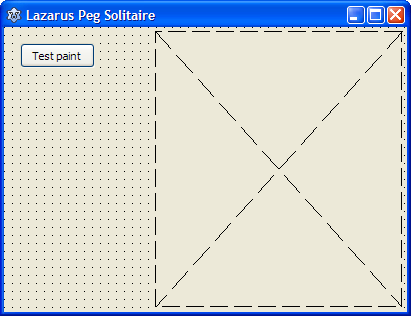
- Resize the form so it looks something like this:
Next step is to draw the cells matrix on this paintbox by splitting it in rows and columns that will contain each cell of the board. To make it scaleable we'll calculate the width and height independantly. We'll need a couple of variables to hold the results. First the width and height of the cells, so all cells (7) fit exactly on the form. We'll develop the painting code interactively and we are going to use the button that was dropped on the form for that.
- Double click the test paint button (this creates the event handler).
- Add 2 variables:
<Delphi>var
 CellWidth : integer;
 CellHeight: integer;</Delphi>
We'll need some extra variables to hold intermediate results:
- Add 3 local variables:
<Delphi> iRow, iCol : TCellNums;
CellArea: TRect</Delphi>CellArea is used to limit the rectangular area on screen where a cell will be drawn.
To process all rows and cols two straightforward for loops will do.
- Add the following code to the event handler:
<Delphi> // Calculate the width/height of each cell to accomodate for all cells in the paintbox
 CellWidth := pbPeg.Width div 7;
 CellHeight := pbPeg.Height div 7;
// Draw boxes for all cells
for iRow := 1 to 7 do
for iCol := 1 to 7 do
begin
// Calculate the position of the cell in the paintbox
CellArea.Top := (iRow-1) * CellHeight;
CellArea.Left := (iCol-1) * CellWidth;
CellArea.Right := CellArea.Left + CellWidth;
CellArea.Bottom := CellArea.Top + CellHeight;
// And now draw the cell
pbPeg.Canvas.Rectangle(CellArea);
end;</Delphi>A Canvas, as it's name suggests, is a control (a drawing surface) that helps us drawing things like lines, rectangles, circles etc. A paintbox control has an embedded canvas. Therefore the line pbPeg.Canvas.Rectangle(CellArea) will draw a rectangle on the paintbox, limited to the area defined in CellArea. And because the paintbox is placed on the form, we can see the result there.
- Compile and run the program (press F9).
- Press the Test paint button.
- Maximize the form (the cells disappear; don't worry we'll fix that).
- Press the Test paint button again.
This proves that our calculations were spot on and that we now have the means to draw whatever is necessary in the right spot. One thing needs to be done though before adding more drawing functionality. Drawing of the cells has no relation with the main form whatsoever (or any form for that matter). The only thing we need for drawing things is a Canvas and some measurements for the cells. So we are going to create a supporting class to clean up the main form.
- Create a new unit (File/New Unit).
- Save it as PegSolPainter (File/Save and then and choose Rename to lowercase).
- Add a new class to the new unit file that will do all of the drawing.
<Delphi>type
 TPegSolPainter = class
 private
   PegSol      : TPegSolitaire;
   Canvas      : TCanvas;
public
constructor Create(pPegSol: TPegSolitaire; pCanvas: TCanvas);
end;</Delphi>Note that a TPegSolitaire variable is also added, because obviously we are going to use that class to retrieve a cells' state.
- Position the text cursor in the constructor line and press Ctrl-Shift-C.
- The constructor must store the 2 parms locally:
<Delphi>constructor TPegSolPainter.Create(pPegSol: TPegSolitaire; pCanvas: TCanvas); begin
 PegSol := pPegSol;
 Canvas := pCanvas;
end;</Delphi>
Trying to compile this code will failse because we haven't added the PegDatastrucures unit to the uses section. And because we use a TCanvas we'll have to add the Graphics unit as well.
- Add PegDatastructures and Graphics to the uses list.
<Delphi>uses
 PegDatastructures,
 Graphics,
 Classes, SysUtils; </Delphi>
The reason we built this class was to remove all drawing and painting code from the form. So we need to create a method that will do the drawing. Before adding that method there is something that needs to be addressed: to calculate the width of a cell, we divide the paintbox width by the number of cells. In theory we could use the property Canvas.Width for this. However that property does not always give us the right width at the right time. So to be able to draw cells, we must provide our draw method with the correct values for the width and height of the canvas.
Now we now this, we can add a paint method to our class.
- Add procedure Repaint to the class.
<Delphi> TPegSolPainter = class
 private
   PegSol      : TPegSolitaire;
   Canvas      : TCanvas;
public
constructor Create(pPegSol: TPegSolitaire; pCanvas: TCanvas);
procedure Repaint(const pCanvasWidth, pCanvasHeight: integer);
end;</Delphi>
- Generate the body of the procedure (Ctrl-Shift-C).
- Copy the code from TfrmMain.Button1Click(Sender: TObject) to this newly created method:
<Delphi>procedure TPegSolPainter.Repaint(const pCanvasWidth, pCanvasHeight: integer); var
 CellWidth    : integer;
 CellHeight   : integer;
 iRow, iCol   : TCellNums;
 CellArea     : TRect;
begin
 // Calculate the width of each cell to accomodate for all cells
 CellWidth := pbPeg.Width div 7;
 CellHeight := pbPeg.Height div 7;
// Draw boxes for all cells
for iRow := 1 to 7 do
for iCol := 1 to 7 do
begin
// Calculate the position of the cell in the paintbox
CellArea.Top := (iRow-1) * CellHeight;
CellArea.Left := (iCol-1) * CellWidth;
CellArea.Right := CellArea.Left + CellWidth;
CellArea.Bottom := CellArea.Top + CellHeight;
// And now draw the cell
pbPeg.Canvas.Rectangle(CellArea);
end;end;</Delphi>
Because we no longer need the paintbox pbPeg we must remove the references to it. Three changes are needed:
- Change the calculation of the CellWidth and CellHeight to:
<Delphi> // Calculate the width of each cell to accomodate for all cells
 CellWidth := pCanvasWidth div 7;
CellHeight := pCanvasHeight div 7;</Delphi>- Change the drawing of the rectangle to:
<Delphi> // And now draw the cell
Canvas.Rectangle(CellArea);</Delphi>Now that we have a class that can do the fancy painting for us, it's time to make use of it. We are going to use this paint class together with the PegSolitare class to draw the cells.
- In the main form source, locate the Button1Click method.
- Remove all statements and variables.
- Add 2 new variables: one for the game class and one for the painter class:
<Delphi>procedure TfrmMain.Button1Click(Sender: TObject); var
 pegsol  : TPegSolitaire;  // The game data
 pegpaint: TPegSolPainter; // The paint class for the game
begin end;</Delphi>
- Add PegSolPainter to the uses list.
To use the paint class is fairley straightforward: create a new instance and call the repaint method like so:
- Add the following code to the Button1Click method:
<Delphi> // Create a new game object
pegsol := TPegSolitaire.Create(7); // Create a new painter object to paint this game
pegpaint := TPegSolPainter.Create(pegsol, pbPeg.Canvas); // And paint the board
pegpaint.Repaint(pbPeg.Width, pbPeg.Height); // Clean up
pegpaint.Free;
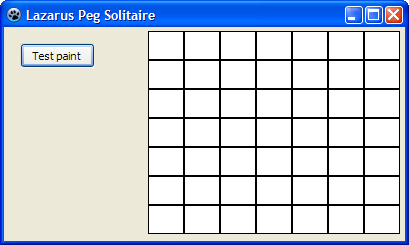
pegsol.Free</Delphi>Run and test the program to see that it works exactly as before.
The result will look something like this:
It's all about events
What have we accomplished so far? There is a datastructure that holds all the data for a Peg Solitaire game, there is a class that can paint on a Canvas and we have a fairly simple form with a test button. So what's next? Events!
As we have seen in the previous section, the cell matrix we painstakingly drew wasn't to last. This happens because the form doesn't know anything about our little game. As soon as the form thinks it's time to redraw itself, it does so and ignores our cell grid. What it dóes do is send a message to it's child controls that a refresh is necessary. This message is available to us in the form of an event: a Paint event.
- Open the form editor (select ufrmMain in the editor and press F12).
- Select the paintbox pbPeg.
- Open the Events tab in the Object Inspector.
- One of the events in the list is OnPaint.
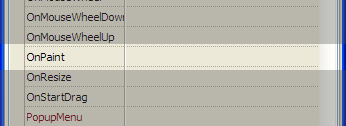
This event is 'fired' everytime the paintbox needs to redraw it's surface. That is the place were we are going to do our drawing.
- Select the OnPaint event in the Object Inspector and click on the small button with three dots. This will generate the event handler body.
- Copy/Paste the exact code from the Button1Click event handler to this new method.
<Delphi>procedure TfrmMain.pbPegPaint(Sender: TObject); var
 pegsol  : TPegSolitaire;  // The game data
 pegpaint: TPegSolPainter; // The paint class for the game
begin
 // Create a new game object
 pegsol := TPegSolitaire.Create(7);
// Create a new painter object to paint this game
pegpaint := TPegSolPainter.Create(pegsol, pbPeg.Canvas); // And paint the board
pegpaint.Repaint(pbPeg.Width, pbPeg.Height); // Clean up
pegpaint.Free;
pegsol.Freeend;</Delphi>
- Remove all code and variables from method Button1Click. Remember: the IDE will automatically remove this now empty method for us.
- Remove the Test paint button from the form.
- Run the program to see what happens.
Now what is clear is that we create a game object in the OnPaint method, paint the empty cells and then destroy it. But we need to store the game object until a game has finished. The same goes for the paint object. So the OnPaint event is not the most logical place to create these objects. The form's class declaration is a better place to store them.
- Find the forms's declaration.
- Add the 2 variables we created in the OnPaint event:
<Delphi> TfrmMain = class(TForm)
   pbPeg: TPaintBox;
   procedure pbPegPaint(Sender: TObject);
 private
   { private declarations }
   pegsol  : TPegSolitaire;  // The game data
   pegpaint: TPegSolPainter; // The paint class for the game
 public
   { public declarations }
 end; </Delphi>
These variables must be initialized as soon as the form opens (or anytime we want to start a new game). So let's create a procedure that does that for us and add it to the private section of the form.
- Add procedure StartNewGame to the form.
<Delphi> private
   { private declarations }
   pegsol  : TPegSolitaire;  // The game data
   pegpaint: TPegSolPainter; // The paint class for the game
procedure StartNewGame;</Delphi>- Generate the body.
- Add the initialzation code:
<Delphi>procedure TfrmMain.StartNewGame; begin
 // Clean up the previous game
 pegpaint.Free;
 pegsol.Free;
// Start with a new game
pegsol := TPegSolitaire.Create(7);
pegpaint := TPegSolPainter.Create(pegsol, pbPeg.Canvas);end;</Delphi>
Now that the initialization code is created, it must be executed. A logical time to do this is as soon as the form is created (i.e. the application is started). For this another event is available to us: the FormCreate event. We can create it in two ways: find the OnFormCreate event in the Object Inspector and click on the '...' button. But another way to generate it is double clicking the form itself.
- Open the form editor (press F12).
- Double click somewhere in a free area on the form; do nót click on the paintbox.
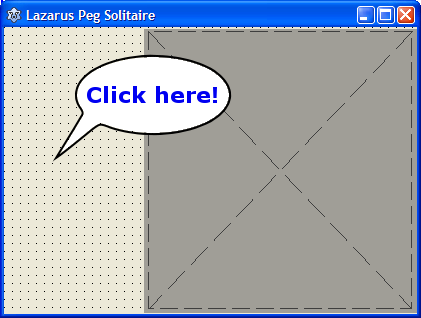
- Add the call to the StartNewGame procedure:
<Delphi>procedure TfrmMain.FormCreate(Sender: TObject); begin
StartNewGameend;</Delphi>
Now that the game and paint objects are created at program start, they are no longer required in the OnPaint method.
- Locate procedure procedure TfrmMain.pbPegPaint(Sender: TObject);
- Remove the local variables and all code except for the line that actualle does the painting.
<Delphi>procedure TfrmMain.pbPegPaint(Sender: TObject); begin
 // Paint the board
 pegpaint.Repaint(pbPeg.Width, pbPeg.Height);
end; </Delphi>
- Run the program and see what happens.
Intermezzo
So far we have focused on building a program to play the classic solitaire game in the 7x7 grid. Is it now possible to create smaller or bigger grids for other type games? Let's test this.
- In the main form locate the StartNewGame method.
- Change the line pegsol := TPegSolitaire.Create(7); to pegsol := TPegSolitaire.Create(5);. So a smaller board with 5x5 squares is created.
- Run the program and see what happens.
As we can see on screen we still see a 7x7 matrix! This is the result of using magic numbers, which we should have avoided (see http://en.wikipedia.org/wiki/Magic_number_%28programming%29#Unnamed_numerical_constants).
Using magic numbers equals disaster: it's a matter of when, not if a program fails.
- Open PegSolPainter.
- Locate the procedure TPegSolPainter.Repaint(const pCanvasWidth, pCanvasHeight: integer);.
In there we see the number of 7 a couple of times. This the magic number that plays tricks on us. In the calculation of the cell width and height, we need the size of the board as stored in the pegsol game variable. And the same goes for the iRow and iCol loops. So let's fix this once and for all: <Delphi> // Calculate the width of each cell to accomodate for all cells
 CellWidth := pCanvasWidth div pegsol.Size;
 CellHeight := pCanvasHeight div pegsol.Size;
// Draw boxes for all cells
for iRow := 1 to pegsol.Size do
for iCol := 1 to pegsol.Size do
begin
// Calculate the position of the cell in the paintbox
CellArea.Top := (iRow-1) * CellHeight;
CellArea.Left := (iCol-1) * CellWidth;
CellArea.Right := CellArea.Left + CellWidth;
CellArea.Bottom := CellArea.Top + CellHeight;
// And now draw the cell
Canvas.Rectangle(CellArea);
end;</Delphi>There's a caveat here: pegsol doesn't have a publicly accessible Size variable. And this is how it should be: all variables in a class should be private. The way to access those private variables is via functions or properties (the interface of the class). For this simple value we will use a property.
- Open PegDatastructures.
- Rename the private variable in TPegSolitaire to FSize.
- Add a public read only property to the class: property Size: TCellNums read FSize;
The class will now look like this: <Delphi> TPegSolitaire = class
 private
   FSize: TCellNums;
   PegCells: TPegCells;
   function GetCell(const pRow, pCol: TCellNums): TCellType;
   procedure SetCell(const pRow, pCol: TCellNums; const pValue: TCellType);
public
constructor Create(const pSize: TCellNums);
property Cell[const pRow, pCol: TCellNums]: TCellType read GetCell write SetCell;
property Size: TCellNums read FSize;
end;</Delphi> It's common practice to prefix variables that are accessed via properties with a letter F. We've made the public access to the size property read-only, because it should never be changed, once the game is started. The only place where the private variable should get it's final value is in the Create constructor.
- Locate the constructor.
- Change Size := pSize; to FSize := pSize; (if you don't you'll get a compilation error).
- And while we're at it, the initialization needs a minor fix as well. There is no need to initialize cells we are not going to use. So the constructor should look like this (C_MAX is replaced with Size):
<Delphi>constructor TPegSolitaire.Create(const pSize: TCellNums); var iRow,iCol: integer; begin
 FSize := pSize;
 for iRow := 1 to Size do
   for iCol := 1 to Size do
     Cell[iRow,iCol] := ctNoAccess;
end;</Delphi>
We are not ready to test the program and see if it now draws a nice 5x5 matrix.
- Run the program and see what happens (a 5x5 matrix is drawn).
Now that the basics of the game are in place, it's time to flesh out the gui.
Let's get artistic
So far so good. We now have a game class, a supporting paint class and an unimpressive checker board on our form (well, sort of). In our solitaire game a cell can have 3 states: not accessible, empty or occupied. For each cell type we want a different graphic representation. Let's get to it.
- In the editor open PegSolPainter (the unit with the paint class for our board).
- Locate the Repaint method.
- Locate the line where the cell is drawn: Canvas.Rectangle(CellArea);.
Obviously we need to make a change here. It depends on the cell state what needs to be drawn (not accessible cell, empty cell or peg cell). The case... operation comes to the rescue.
- Change the drawing of cells like so:
<Delphi> // Draw boxes for all cells
 for iRow := 1 to pegsol.Size do
   for iCol := 1 to pegsol.Size do
   begin
     // Calculate the position of the cell in the paintbox
     CellArea.Top    := (iRow-1) * CellHeight;
     CellArea.Left   := (iCol-1) * CellWidth;
     CellArea.Right  := CellArea.Left + CellWidth;
     CellArea.Bottom := CellArea.Top  + CellHeight;
// And now draw the cell based on the cell's contents
case pegsol.Cell[iRow,iCol] of ctNoAccess: // Draw cells that are not accessible
begin
Canvas.Brush.Color := clGray;
Canvas.Rectangle(CellArea);
end; ctEmpty: // Draw cells that are currently empty
begin
Canvas.Brush.Color := clBlue;
Canvas.Rectangle(CellArea);
end; ctPeg: // Draw cells that are occupied
begin
Canvas.Brush.Color := clBlue;
Canvas.Rectangle(CellArea); // Erase the background first
Canvas.Ellipse(CellArea);
end;
end;
end;</Delphi>We could run the program at this stage (just try it), but it will only display a boring 5x5 grayish grid. This is because we didn't define any game setup yet. Let's fix this first.
- Open the main form source.
- Locate the StartNewGame method.
- Create a 7x7 game instead of 5x5.
- Initialize a couple of cells. For example:
<Delphi>procedure TfrmMain.StartNewGame; begin
 // Clean up the previous game
 pegpaint.Free;
 pegsol.Free;
// Start with a new 7x7 game
pegsol := TPegSolitaire.Create(7);
pegpaint := TPegSolPainter.Create(pegsol, pbPeg.Canvas); // Initialize some cells
pegsol.Cell[3,4] := ctEmpty;
pegsol.Cell[4,2] := ctPeg;
pegsol.Cell[4,3] := ctPeg;
pegsol.Cell[4,4] := ctEmpty;
pegsol.Cell[4,5] := ctPeg;
pegsol.Cell[4,6] := ctPeg;
pegsol.Cell[5,4] := ctEmpty;end;</Delphi>
- Run the program (it'll look something like the image below).
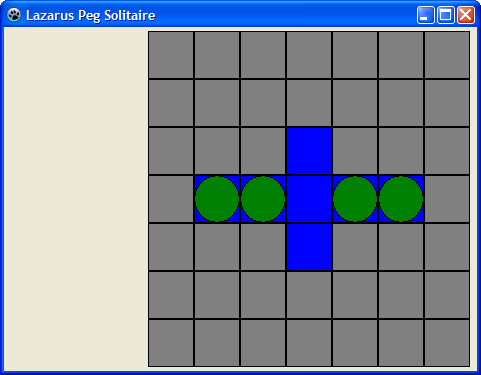
Populate the board
As we now a classic solitaire board should look something like this:
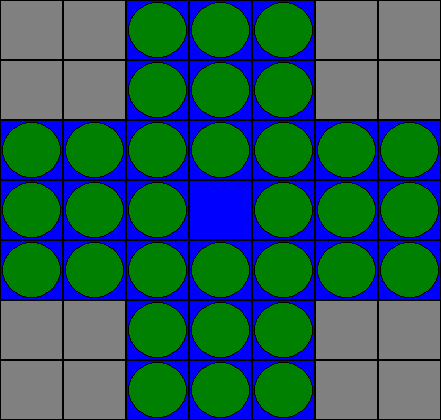
And if we were to populate all cells individually, that would result in a lot of code. What if we could intialize the game by just passing it some text that would symbolically describe the board? Something like this: <Delphi> // Initialize the cells to the classic game
 pegsol.InitializeBoard( '  ooo  ' + LineEnding +
                         '  ooo  ' + LineEnding +
                         'ooooooo' + LineEnding +
                         'ooo.ooo' + LineEnding +
                         'ooooooo' + LineEnding +
                         '  ooo  ' + LineEnding +
' ooo ' );</Delphi>- o is an occupied cell.
- . is an empty but playable cell.
- The spaces indicate cells that are not accessible.
Let's assume this is going to work and create a method in the TPegSelitaire class that can handle this.
- Let's be optimistic (also called 'Top down design') and add the above code to TfrmMain.StartNewGame:
<Delphi>procedure TfrmMain.StartNewGame; begin
 // Clean up the previous game
 pegpaint.Free;
 pegsol.Free;
// Start with a new 7x7 game
pegsol := TPegSolitaire.Create(7);
pegpaint := TPegSolPainter.Create(pegsol, pbPeg.Canvas); // Initialize the cells to the classic game
pegsol.InitializeBoard( ' ooo ' + LineEnding +
' ooo ' + LineEnding +
'ooooooo' + LineEnding +
'ooo.ooo' + LineEnding +
'ooooooo' + LineEnding +
' ooo ' + LineEnding +
' ooo ' );end;</Delphi>
- Open the PegDatastructures sourcefile.
- Add this procedure to the public section of the class: InitializeBoard(const pBoard: ansistring);
<Delphi> public
   constructor Create(const pSize: TCellNums);
   procedure InitializeBoard(const pBoard: ansistring);
property Cell[const pRow, pCol: TCellNums]: TCellType read GetCell write SetCell;
property Size: TCellNums read FSize;</Delphi>- Generate the body of InitializeBoard (Ctrl-Shift-C...).
Now what does this procedure actually need to do? It must split the textstring into seperate lines and then process those lines, Because we used LineEnding tokens to separate the lines, we can use a TStringList class to split them.
- Code InitalizeBoard like so:
<Delphi>procedure TPegSolitaire.InitializeBoard(const pBoard: ansistring); var lst : TStringList;
   iRow,iCol: integer;
   s        : string;
begin
 // Create a list with the board text in it. This will split all lines
 // into individual lines, because of the LineEnding 'splitter'.
 lst := TStringList.Create;
 lst.Text := pBoard;
// Process all lines one at a time
for iRow := 0 to lst.Count-1 do
if iRow < Size then // Make sure there is no overflow in the rows
begin
// Process a single line of text
s := lst[iRow];
for iCol := 1 to length(s) do
if iCol <= Size then // Make sure there is no overflow in the columns
case s[iCol] of
' ': Cell[iRow+1,iCol] := ctNoAccess;
'.': Cell[iRow+1,iCol] := ctEmpty;
'o': Cell[iRow+1,iCol] := ctPeg;
end;
end; // Clean up the list
lst.Free;end;</Delphi>
- a TStringList is used as a buffer. This works because we used LineEnding as a separator between all lines.
- There are Count number of lines, but they are numbered 0..Count-1. Our cells are numbered starting with 1. That's why you see iRow+1 in the cell assignments.
The above procedure contains a lot of extra variables and shouldn't be that difficult to understand. It's possible to reduce the procedure to the bare minimum like so: <Delphi>procedure TPegSolitaire.InitializeBoard(const pBoard: ansistring); var iRow,iCol: integer; begin
 with TStringList.Create do
 begin
   Text := pBoard;
   for iRow := 0 to Min(Count-1, Size-1) do
     for iCol := 1 to Min(length(Strings[iRow]),Size) do
       case Strings[iRow][iCol] of
         ' ': Cell[iRow+1,iCol] := ctNoAccess;
         '.': Cell[iRow+1,iCol] := ctEmpty;
         'o': Cell[iRow+1,iCol] := ctPeg;
       end;
   Free;
 end;
end;</Delphi> This procedure does exactly the same but it uses the handy feature that you can use the With statement together with dynamically created objects. For this procedure to work add the Math unit to the uses section.
- Run the program. All cells are now populated like in the classic Peg Solitaire game.