

(This page is currently under construction. I can't find how to hide this page while I'm working on it, so if you have accidentally stumbled across it: move along, move along, nothing to see here :-) )
FPVectorial - Document Support
Background
The fpvectorial library can be used to create formatted text files in a variety of file formats. Current file support includes Open Document XML (odt) and Open Office XML (docx). The files can be opened in a variety of products including Microsoft Office, OpenOffice and LibreOffice.
As the name suggests, the FPVectorial library was originally created solely as a vector based image library. Support for creating documents was added to FPVectorial as the existing architecture already had the concept of a Document containing Pages, and it's architecture was easily extendable. Document support was added beside the existing image handling classes. Vector based images are differentiated from office documents by the type of page added to TvVectorialDocument. At this time, two different pages can be added to TvVectorialDocument:
- TvTextPageSequence: This is used by all Office Document writers.
- TvVectorialPage: This is used for Vector Image writers, and is currently ignored by the office document writers.
Currently there are two Office Document writers.
- TODTVectorialWriter.pas: for producing .odt files suitable for opening in OpenOffice and LibreOffice
- TDOCXVectorialWriter: for opening files in Microsoft Office 2007 onwards.
Instead of focusing on the requirements of each individual file format, Office Document support inside FPVectorial was added by creating and implementing a Document Class Hierarchy. It is then up to each individual reader and writer to interpret this class hierarchy.
Alternative Library - fpOdf
If you want to produce an ODT file by concentrating on the File Format, then the fpOdf library implemented by dgaspary and made available on the forums is recommended. This allows fine control when creating an ODT file, including many options not provided by FPVectorial - Document Support. A deeper understanding of the file format specification is required when using fpOdf, this complexity is hidden when using FPVectorial.
Forum Link:
Topic: fpOdf - Creating and modifying OpenDocument ODF files with freepascal
Download
fpvectorial comes in the Lazarus SVN, in the directory components/fpvectorial:
svn co http://svn.freepascal.org/svn/lazarus/trunk/components/fpvectorial fpvectorialSee also fpvectorial
Roadmap
| Functionality | OpenDocument (ODT) | Office Open XML (DOCX) |
| File Version | ODT 1.2 with extensions | ECMA-376 1st Edition (2006) |
| Supported Style Types | Paragraph and Text-Span | Paragraph and Text |
| Table Support | Yes | Yes |
| List Support | Partially Implemented (Bullets only) | Partially Implemented (Bullets only) |
| Multiple Headers/Footers | Not yet | Yes |
| Tables in Header/Footer | Not yet | Not tested |
| Image Support | Not yet | Not yet |
| Images in Header/Footer | Not yet | Not yet |
| FPVectorial Image Support | Not yet | Not yet |
| Tab Stops | Not yet | Not yet |
| Document Fields | Not yet | Not yet |
| Meta Data | Partially Implemented | Not yet |
| Table of contents | Not yet | Not yet |
| Footnotes | Not planned | Not planned |
| Review/Revision | Not planned | Not planned |
| Bookmarks / Hyperlinks | Not planned | not planned |
| Comments | Not planned | Not planned |
Hello World Example
The following code will produce a "Hello World" document. As no styles are defined, it is entirely up to the program used to open the resulting files (Microsoft Word, LibreOffice Write etc) to determine font and font size...
Program HelloWorld;

{$mode objfpc}{$H+}

Uses
  fpvectorialpkg, fpvectorial;

Var
  Document: TvVectorialDocument;
  Page: TvTextPageSequence;
  Paragraph: TvParagraph;

Begin
  Document := TvVectorialDocument.Create;
  Try
    Page := Document.AddTextPageSequence;
    Paragraph := Page.AddParagraph;
    Paragraph.AddText('Hello World!');

    Document.WriteToFile('Hello_World.docx', vfDOCX);
    Document.WriteToFile('Hello_World.odt', vfODT);
  Finally
    Document.Free;
  End;
End.
Basic Concepts
- A single FPVectorial Document (TvVectorialDocument) consists of a series of Page Sequences.
- Each Page Sequence can have it's own Header and Footer, and it's own Page Setup (size, orientation)
- Text, Tables, Images are added to the Page Sequence. In this way the document is built up.
- FPVectorial has no concept of how many pages are in a document, only the number of Page Sequences. A large multipage document may only have a single Page Sequence.
- A single Page Sequence can have multiple Paragraphs added.
- Text is added inside Paragraphs. Paragraphs consist of multiple text runs. A single Paragraph can have a single Paragraph style. Each text run can have an optional text style applied (allowing, for instance, the bolding of individual words in a paragraph).
- All Paragraph and Text Styles must be defined before being used. FP Vectorial supports style inheritance. Microsoft Office, OpenOffice and LibreOffice allow only partial styles to be defined, though each office implements its own different set of defaults for any missing properties. If it is critical that the document look identical in each of the Office Suites, then the Styles should be fully defined.
- A default set of Styles can be added to the FP Vectorial Document by calling AddDefaultStyles.
- Headings are Paragraph Styles, with additional properties covering Heading Level and numbering
- Tables consist of a collection of rows.
- Table rows consist of a collection of cells.
- Tables can add optional column information. This must be provided if merged cells are being used.
- Any Table Cell can support any document object, including multiple paragraphs, images and even nested Tables.
- Headers and Footers are built up in an identical manner to a Page Sequence.
- TvVectorialDocument is responsible for freeing any entity added using the .AddXXX calls.
Code Examples
Styles
This example uses both the default styles that can be added to TvVectorialDocument via AddStandardTextDocumentStyles, and a Text-Span style added specifically to TvVectorialDocument. Text-Span styles should not be applied to Paragraphs, only to individual Text Spans within a Paragraph.
Uses
fpvectorialpkg, fpvectorial;
Var
Document: TvVectorialDocument;
Page: TvTextPageSequence;
Paragraph: TvParagraph;
BoldTextStyle: TvStyle;
Begin
Document := TvVectorialDocument.Create;
Try
// Adds the defaut Paragraph Styles
// StyleTextBody, StyleHeading1,
// StyleHeading2 & StyleHeading3
Document.AddStandardTextDocumentStyles(vfUnknown);
// Add our own Style
BoldTextStyle := Document.AddStyle();
BoldTextStyle.Kind := vskTextSpan;
BoldTextStyle.Name := 'Bold';
BoldTextStyle.Font.Bold := True;
BoldTextStyle.SetElements := BoldTextStyle.SetElements + [spbfFontBold];
// Create the Document
Page := Document.AddTextPageSequence;
Paragraph := Page.AddParagraph;
Paragraph.Style := Document.StyleTextBody;
// Add Hello World as two text spans within the same paragraph,
// and make 'World' bold
Paragraph.AddText('Hello ');
Paragraph.AddText('World!').Style := BoldTextStyle;
Document.WriteToFile('Hello_World.docx', vfDOCX);
Document.WriteToFile('Hello_World.odt', vfODT);
Finally
Document.Free;
End;
End.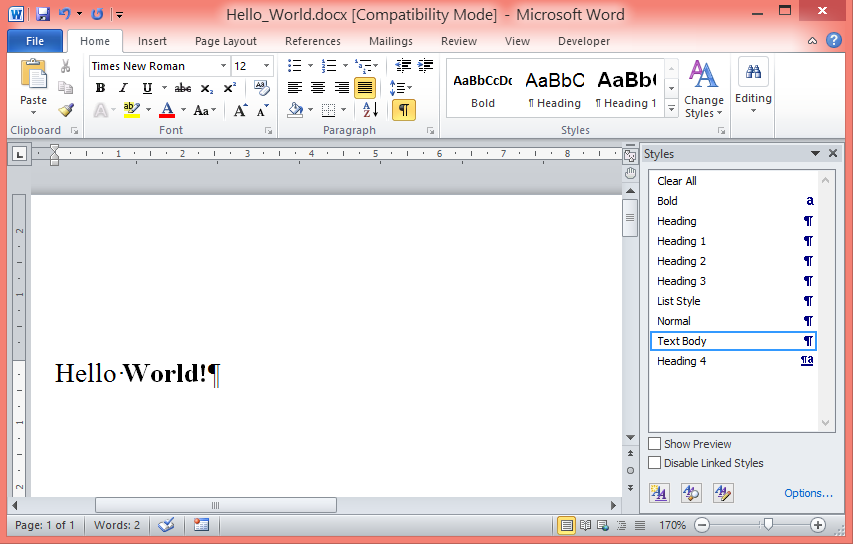 Output of extended Hello World! program
Simple Table
Table with Merged Cells
Known Issues
- List support is currently experimental
- Table support in ODT writer results in large file sizes. This is due to the fact that a style is created for each individual cell, even if multiple cells are identically formatted. This also applied to row styles and column styles. In order to resolve this, Cell, Row and Column Styles could be normalised. Alternatively, the entire table formatting architecture could be re-written to force the end user to create and apply the styles themselves (in addition to also requiring DOCX table support to be re-written to support the new architecture, specific code will need adding to DOCX writer to interpret the new FP Vectorial Table Styles).
- ODT Writer produces files that cannot be opened in Word 2010.
- File MIMETYPE in ODTDocument should not be compressed. Currently clNone compression type is ignored by TZipper (possible cause for Word 2010 rejecting existing ODT files). Patch exists, and needs investigating as to why this hasn't been added to FPC trunk.
TODO
General
- Comprehensive testing, including opening the files in as many word processors and office suites as possible.
- DOCX and ODT Readers (volunteers required
- Add PDF reader/writer (current PDF support is for Vector Image support only)
- Add HTML reader/writer
- Add RTF reader/writer
- Produce well documented examples and store in FPVectorial/Documents
- Code Documentation for distributing with Lazarus
New Code
See Roadmap above...
Partially complete
- List support is only partially implemented in FP Vectorial, ODT Writer and DOCX Writer. The design needs finishing, and then re-implementing in the two writers
ODTWriter
- Support for Header/Footers and support for Tables within Headers/Footers. This requires a refactoring of ODT writer. Header and Footer content is actually stored in styles.xml, not in content.xml. All current text and table support can only produce content in content.xml.