

Navigation
editThis dialog can be reached from the Lazarus IDE Main Menu > Tools > Options > Editor > General > Miscellaneous and from the source editor popup context menu "Options...".
Miscellaneous Options
edit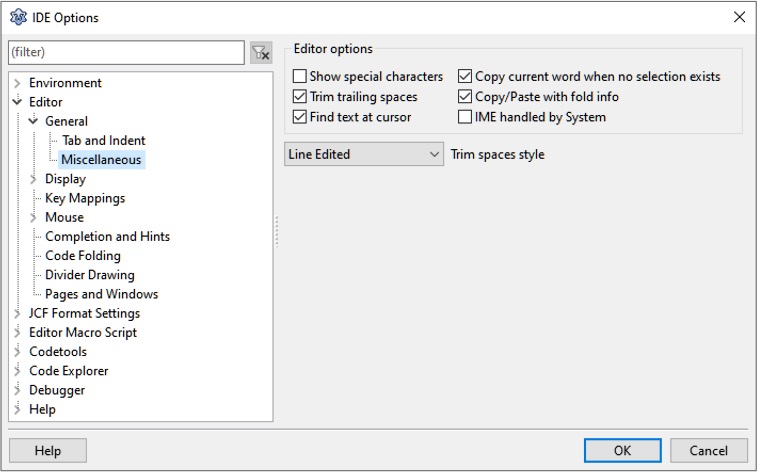
- Show special characters: Spaces are shown as dots and invalid characters as question marks.
- Copy current word when no selection exists: If nothing is selected and user presses Copy (CTRL+C or CMD+C), the editor selects the nearest word on the same line as the cursor and copies that. The same applies if nothing is selected when the user presses Cut (CTRL+X or CMD+X).
- Trim trailing spaces: Spaces at the end of lines will be trimmed and not saved. This applies only to edited lines.
- Trim spaces style: Defines how aggressively spaces are trimmed. The source editor allows the entering of "uncommitted" spaces at the end of line, so you can continue typing as usual. If the editor deems those spaces no longer needed it will trim them.
- Leave line: This is the default, the editor will keep all spaces on the line where the caret is. If the caret moves to another lines, spaces are trimmed.
- Line Edited: In Addition to leaving the line, the editor will also remove any space to the right of the caret, if the line is edited. If you type spaces on the end of the line, they will be to the left of the caret and not affected.
- Caret or Edit: This is the most aggressive mode, in addition to "Line Edited" trimming, it will also trim spaces right to the caret, if you move horizontally (a caret-left at the end of line acts similarly to a backspace)
- Position Only: No spaces or tabs are inserted past the end of line. Only the caret is moved (and forced past EOL). If text is typed, the gap is always filled with spaces.
- This means tabs are lost (converted to space). As a result, auto-indent "copy tabs" does not work in this mode
- Because you are "past the EOL", smart unindent does not work in this mode
In any of those cases spaces you typed at the end of line will not be saved to a file. Read more about trailing spaces
You may want to look at "End key jumps to nearest start". This allows you to keep spaces while editing, yet jump to the visible end of line.
Copy/Paste with fold info: Copying/pasting text within the IDE will remember if text was folded when copied, and (if possible) restore the fold(s) when pasted.
Find text at cursor: When invoking the Main Menu > Search > Find dialog, fetch the word at the cursor and put it into the Find text field.
IME handled by system: ???
See also
edit- Editor Options - Overview of all Editor Options.
- IDE Options - Overview of all options for the IDE.