


This article applies to Windows only.
See also: Multiplatform Programming Guide
概述
editLazActiveX 包包含 TActiveXContainer 组件,以及集成开发环境集成了从类型库或直接从对象(exe 或 dll)创建 ActiveX 组件所需的工具。ActiveX 是 Microsoft Windows 技术,只能在该平台上使用。可以跨编译到 Windows,但用于创建 COM 绑定的 typelib 导入器仅能在 Windows 上运行(未测试过 wine)。
安装
editLazActiveX 需要 2.6.1 版以上的 FPC。导入类型库仅适用于 Windows XP 或更新版本。
从菜单 '软件包'/'安装/卸载软件包...' 打开窗口, 选择 LazActiveX 0.1,点击'安装选中的' , '保持并重建IDE'. 或者, 打开 LazActiveX.lpk 软件包 ,并点击 'Use >>'/'Install'.
安装成功后,组件面板中会新增一个新的“ActiveX”标签页。

用法
edit使用ActiveX组件有三种不同的方式:
- 在窗口上放置TActiveXContainer控件,并将ActiveX ClassName赋值到OleClassName属性上。适合后期绑定,且无需直接事件支持。
- 导入 ActiveX 类型库,在窗口上放置 TActiveXContainer,实例化 ActiveX 对象并将其分配到 ComServer 属性中。适合早期绑定并支持事件。
- 从类型库或对象创建一个新组件,并将该组件放入表单。这同样使用早期绑定,并支持完整的事件。事件处理程序可以从 IDE 中分配。
TActiveXContainer的后期绑定
edit虽然理论相当复杂,但后期绑定是运行 ActiveX 组件的最快方法。
后期绑定指的是与对象的接口全部在运行时完成。对对象的引用以变体形式存储为dispinterface,且在运行时“发现”对象的方法和属性。
编译器会帮你生成所有运行时的代码,但缺点是它无法在设计时帮你查找方法或属性的名称
ActiveX 对象的完善文档说明至关重要(Visual Basic 示例代码可轻松转换为 Pascal 代码)。方法名及其参数中出现的所有错误均为运行时错误。这种运行时的 “动态发现” 机制也会带来相当大的系统开销。 示例: 在窗体中嵌入 VLC 播放器。请注意:必须预先安装 VLC 播放器!
- 拖放一个 TActiveXContainer, 一个 TButton 和一个 TFileNameEdit 到窗体上.
- 调整TActiveXContainer的位置和大小,在OleClassName属性设置为 'VideoLAN.VLCPlugin.2' 并将 Active属性设置为 true.就像下面这样的窗口:
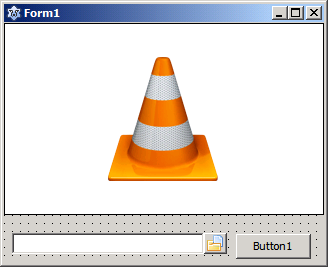
- 为button 创建Onclick 事件并输入:
procedure TForm1.Button1Click(Sender: TObject);
var
  actx: variant;
  fn: widestring;
begin
  actx := ActiveXContainer1.ComServer;
  fn := UTF8Decode('file:///'+StringReplace(FileNameEdit1.FileName, '\', '/', [rfReplaceAll]));
  // or using uriparser (add uriparser unit to uses clause)
  // fn := UTF8Decode(UriParser.FilenameToURI(FileNameEdit1.FileName));
  actx.playlist.add(fn);
  actx.playlist.play;
end;- 运行程序,选择一部影片,然后点击按钮即可观看影片。请注意,VLC 和 gdb 似乎会导致一些问题(最好的情况是启动缓慢、挂起或崩溃),最好在IDE环境之外运行程序。
TActiveXContainer 早期绑定
edit早期绑定意味着所有接口编译器都已知。所以我们需要为 ActiveX 对象创建 Pascal 绑定。fpc utils 目录里的 importtl.exe 工具会帮你做这件事,并创建类和事件监听器,方便在 Pascal 中使用这些对象。importtl.exe工具的图形界面集成于LazActiveX包中,可通过工具菜单中的“导入类型库”访问。
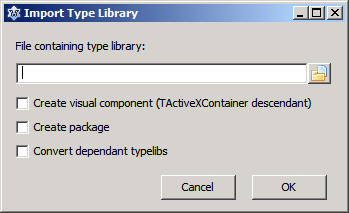
选中 "Convert dependent typelibs(转换相关的typelibs)"可转换所选对象最终使用的 COM 对象的类型库。单击 "确定 "将启动 typelib 导入,并在集成开发环境中创建新单元。单元的命名如下LibraryName_MajorVersion_MinorVersion_TLB。例如:Access_9_0_TLB。
Delphi users: Delphi 单元命名不使用版本号。
Instantiating an ActiveX object is done at run-time by calling the Create method for the appropriate CoClass created for the library. Some ActiveX libraries expose several objects and multiple CoClasses are created. Consult the documentation for the ActiveX library in case of doubt. Assigning the instantiated ActiveX object to the ComServer property of an TActiveXContainer on a form and setting it's active property to true is all that is needed to embed it in the application.
Example: Embed VLC player in a form. VLC has to be installed !!
- Drop a TActiveXContainer, a TButton and a TFileNameEdit on a form. Resize and position TActiveXContainer to your liking
- Open 'Import Type Library' from the tools menu and select 'axvlc.dll' in your VLC installation directory. Click OK. The AXVLC_1_0_TLB unit is created.
- Add AXVLC_1_0_TLB to the uses clause.
- Create an OnClick event for the button and an OnCreate event for the form. Enter the following code:
uses ..., variants, ....

var
  VLC:IVLCControl2;

procedure TForm1.Button1Click(Sender: TObject);
var fn: widestring;
begin
 fn := UTF8Decode('file:///'+StringReplace(FileNameEdit1.FileName, '\', '/', [rfReplaceAll]));
 VLC.playlist.add(fn,'',vararrayof([':aspect-ratio=16:9']));
 VLC.playlist.play;
end;

procedure TForm1.FormCreate(Sender: TObject);
begin
  VLC:=CoVLCPlugin2.Create;
  ActiveXContainer1.ComServer:=VLC;
  ActiveXContainer1.Active:=true;
end;
- Run the program, select a movie and click the button to view the movie.
The typelib importer adds also event support for ActiveX that generate them. In that case, alongside the CoClass a TEventSink descendant is defined that implements the ActiveX object and all its OnEvent properties. Use the TEventSink descendant instead of the CoClass if you want to use the events. Its name starts with TEvs followed by the class name.
Example: Internet Explorer in a form with event support.
- Drop a TActiveXContainer, a TButton, TLabel and a TEdit on a form. Resize and position TActiveXContainer to your liking
- Open 'Import Type Library' from the tools menu. Select Microsoft Internet Controls from the list of available controls or select “C:\WINDOWS\system32\ieframe.dll” from “File containing type library:”. Click OK. The SHDocVw_1_1_TLB unit is created.
- Add SHDocVw_1_1_TLB to the uses clause.
- Create an OnClick event for the button and an OnCreate event for the form.
- Create in class TForm1 the private procedure OnStatusTextChange(Sender: TObject;Text_:WideString);
- Enter the following code:
uses ... variants, SHDocVw_1_1_TLB, ...

var
  Browser:TEvsWebBrowser;

procedure TForm1.Button1Click(Sender: TObject);
var
  url,onull:Olevariant;

begin
  url:=Utf8decode(Edit1.Text);
  onull:=NULL;
  Browser.ComServer.Navigate2(url,onull,onull,onull,onull);
end;

procedure TForm1.FormCreate(Sender: TObject);
begin
  Browser:=TEvsWebBrowser.Create(Self);
  ActiveXContainer1.ComServer:=Browser.ComServer;
  ActiveXContainer1.Active:=true;
  Browser.OnStatusTextChange:=@OnStatusTextChange;
end;

procedure TForm1.FormDestroy(Sender: TObject);
begin
  Browser.Free;
end;

procedure TForm1.OnStatusTextChange(Sender: TObject; Text_: WideString);
begin
  Label1.Caption:=UTF8Encode(Text_);
end;
- Run the program, enter an URL in the Edit control and click the button to navigate to the URL. Label1 will show the status messages sent by the browser.
- To access the document object (DOM) you have to import also the typelib from C:\WINDOWS\system32\mshtml.tlb and add the created MSHTML_4_0_TLB to the uses clause. To display for example the contents of the <body> tag of the downloaded page, add a TMemo and a second TButton to the form and add the following code:
procedure TForm1.Button2Click(Sender: TObject);
var  Doc: IHTMLDocument2; //defined in MSHTML_4_0_TLB
begin
  Doc := Browser.ComServer.Document as IHTMLDocument2;
  Memo1.Lines.Text := utf8encode(Doc.parentWindow.document.Get_body.innerHTML);
end;
Note that CoClasses are not destroyed. As all COM objects they are reference counted and destroy themselves when the last reference goes out of scope. The TEventSink descendant has to be destroyed.
Creating visual ActiveX components from type libraries or objects
editInstead of using the TActiveXContainer component directly the importtl tool can create TActiveXContainer descendants for every ActiveX object embedded in the type library and create a lpk package for you. The descendants have full support for events generated by the objects. To create a package with the ActiveX components open the 'Import Type Library' window in the 'Tools' menu. Select the library to import, check 'Create package' and eventually 'Convert dependent typelibs', click on 'OK' to create the package. You will be prompted for a directory to store the package. Install the new package. After the Lazarus rebuild you'll find the new components in the ActiveX tab of the component palette.
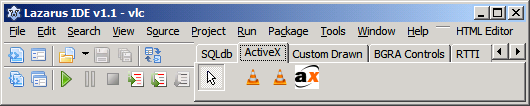
Example: Embed VLC player in a form. VLC has to be installed !!
- Open 'Import Type Library' from the tools menu and select 'axvlc.dll' in your VLC installation directory. Check 'Create package'. Click OK. Select a directory to store the package. The AXVLC_1_0_TLBP package and all the needed units are created. Install the AXVLC_1_0_TLBP package and rebuild the IDE.
- Drop a TAxcVLCPlugin2 (from ActiveX component tab), a TButton and a TFileNameEdit on a form.
- Set TAxcVLCPlugin2.Active to true and resize and position TActiveXContainer to your liking.
- Create an Onclick event for the button and enter:
uses variants, URIParser;
...
procedure TForm1.Button1Click(Sender: TObject);
begin
  AxcVLCPlugin2_1.OleServer.playlist.add(URIParser.FilenameToURI(FileNameEdit1.FileName),'',vararrayof([':aspect-ratio=16:9']));
  AxcVLCPlugin2_1.OleServer.playlist.play;
end;
- Run the program, select a movie and click the button to view the movie.
Event handlers for the components can be created directly from the Object Inspector. (Note the VLC version 1.1.5.0 typelib advertises events but fails to establish a connection point. This appears to be a bug in VLC).
Delphi users: Delphi creates a stub for every method and property in its ActiveX components. importtl does not add this additional layer and the AxctiveX methods are called through the components OleServer property. Fe. AxcVLCPlugin2_1.OleServer.playlist.play is the equivalent to VLCPlugin21.playlist.play in Delphi.