

Intro
editI needed to make an app, cross platform, for Windows/Linux/Mac, which embeds Python engine. I tried Python4Delphi, it didn't compile and work on Linux x64 and Mac. App must use portable Python on Windows, system Python on Linux/Mac.
Update for Python4Delphi: The commit from 21.1.2018 claims the compatibility with both Lazarus and (hopefully) Delphi Linux
Results
editGithub repo: https://github.com/Alexey-T/Python-for-Lazarus
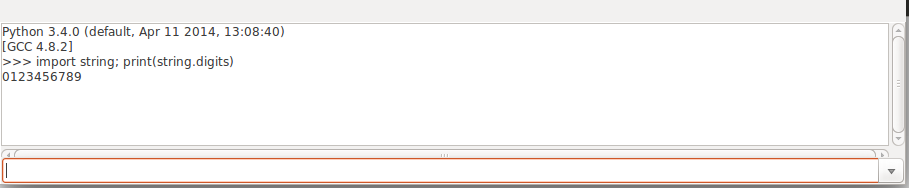
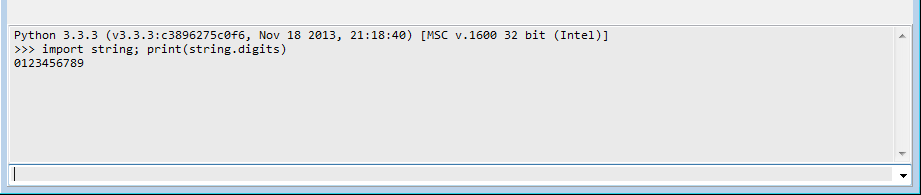
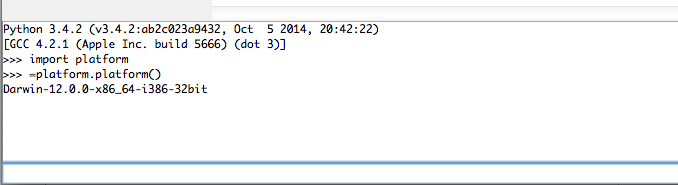
It has demo, which shows TEdit+TMemo as Python console, to input commands in Edit and show results in Memo. Special allowed first char "=" means to do "print(...)".
Screenshot on Ubuntu 14 x64:
Screenshot on Windows 7 x64:
Screenshot on macOS 10.8:
Repo was forked from Python4Delphi package. Compile and install the Lazarus package. You will see "Python" tab in IDE component palette. What is changed since original Python4Delphi:
- deleted all refs to units "..Delphi..", seems units aren't needed for Lazarus apps.
- modifications to PythonEngine.pas, see lines with "//AT".
- added support for macOS, for ex by replacing "$ifdef linux" with "$ifdef unix".
Files on Windows
editOn Windows you need to copy files to app folder.
Python 3.3
editFrom "Sublime Text 3" installation for Windows, take Python files:
- python33.dll
- msvcr100.dll
- python33.zip
- .pyd files, copy them to subfolder DLLs
Python 3.5 or later
editYou need files for another Python version: *.dll, *.pyd, python*.zip. Get them at official site Python.org:
- "Windows x86 embeddable zip file" for 32-bit application
- "Windows x86-64 embeddable zip file" for 64-bit application
Also you must change Lazarus component property for your Python version: DllName and/or DllPath. See the demo program, how to set them.
procedure TfmMain.DoPy_InitEngine;
var
  S: string;
begin
  S:=
    {$ifdef windows} cPyLibraryWindows {$endif}
    {$ifdef linux} cPyLibraryLinux {$endif}
    {$ifdef darwin} cPyLibraryMac {$endif} ;
  PythonEngine.DllPath:= ExtractFileDir(S);
  PythonEngine.DllName:= ExtractFileName(S);
  PythonEngine.LoadDll;
end;
Manifest file
editManifest file (for all Python versions) should be named like "appname.exe.manifest".
  <?xml version="1.0" encoding="UTF-8" standalone="yes"?>
  <assembly xmlns="urn:schemas-microsoft-com:asm.v1" manifestVersion="1.0">
    <noInheritable/>
    <assemblyIdentity
        type="win32"
        name="DelphiApplication"
        version="1.0.0.0"
        processorArchitecture="*"/>
    <dependency>
      <dependentAssembly>
        <assemblyIdentity type='win32' name='Microsoft.Windows.Common-Controls' version='6.0.0.0' processorArchitecture='*' publicKeyToken='6595b64144ccf1df' language='*' />
      </dependentAssembly>
    </dependency>
    <trustInfo xmlns="urn:schemas-microsoft-com:asm.v3">
      <security>
        <requestedPrivileges>
          <requestedExecutionLevel level='asInvoker' uiAccess='false' />
        </requestedPrivileges>
      </security>
    </trustInfo>
  </assembly>
Files on MacOS
editmacOS doesn't have preinstalled Python. User needs to install Python 3 package (demo must work with Py 3.4) from official http://www.python.org.
Then full path to Python library must be set in program code. It is easy to set this path, it is always the standard path like "/Library/Frameworks/Python.framework/Versions/3.5/lib/libpython3.5.dylib" (with different numbers 3.x).
Code
editForm
editPut on form:
- TPythonEngine
- TPythonInputOutput
- TCombobox (edConsole)
- TMemo (memoConsole)
Properties of PythonEngine:
- AutoLoad=False
- DllName empty
- DllPath empty
- FatalAbort=False
- InitScript="import sys; print('Python', sys.version)"
- IO=PythonInputOutput1
- PyFlags=[pfIgnoreEnvironmentFlag]
- UseLastKnownVersion=False
Event handlers
edit- PythonEngine.OnAfterInit: must set "sys.path" for Win (remember, we use portable py for Win).
procedure TfmMain.PythonEngineAfterInit(Sender: TObject);
var
  dir: string;
begin
  {$ifdef windows}
  dir:= ExtractFilePath(Application.ExeName);
  Py_SetSysPath([
    dir + 'DLLs',
    dir + 'python33.zip'
    ]);
  {$endif}
end;

procedure Py_SetSysPath(const Dirs: array of string);
var
  Str: string;
  i: Integer;
begin
  Str:= '';
  for i:= 0 to Length(Dirs)-1 do
    Str:= Str + 'r"' + Dirs[i] + '"' + ',';
  Str:= Format('sys.path = [%s]', [Str]);
  GetPythonEngine.ExecString(Str);
end;- PythonInputOutput.OnSendData, OnSendUniData:
procedure TfmMain.PythonInputOutput1SendData(Sender: TObject;
  const Data: AnsiString);
begin
  memoConsole.Lines.Add(Data);
end;

procedure TfmMain.PythonInputOutput1SendUniData(Sender: TObject;
  const Data: UnicodeString);
begin
  memoConsole.Lines.Add(Data);
end;- edConsole.OnKeyPress:
procedure TfmMain.edConsoleKeyPress(Sender: TObject; var Key: char);
var
  Str: string;
begin
  if Key=#13 then
  begin
    Str:= edConsole.Text;

    //support entering "=some cmd"
    if (Str<>'') and (Str[1]='=') then
      Str:= 'print('+Copy(Str, 2, MaxInt) + ')';

    memoConsole.Lines.Add('>>> '+Str);
    edConsole.Text:= '';
    edConsole.Items.Insert(0, Str);
    try
      GetPythonEngine.ExecString(Str);
    except
    end;
  end;
end;- main form OnCreate:
const
  cPyLibraryWindows = 'python33.dll';
  cPyLibraryLinux = 'libpython3.4m.so.1.0';
  cPyLibraryMac = '/Library/Frameworks/Python.framework/Versions/3.4/lib/libpython3.4.dylib';

procedure TfmMain.FormCreate(Sender: TObject);
var
  S: string;
begin
  S:=
    {$ifdef windows} cPyLibraryWindows {$endif}
    {$ifdef linux} cPyLibraryLinux {$endif}
    {$ifdef darwin} cPyLibraryMac {$endif} ;
  PythonEngine.DllPath:= ExtractFileDir(S);
  PythonEngine.DllName:= ExtractFileName(S);
  PythonEngine.LoadDll;
end;