


This article applies to macOS only.
See also: Multiplatform Programming Guide

This article applies to iOS only.
See also: Multiplatform Programming Guide
This page gives an overview of the LCL Carbon interface for Mac OS X and will help new developers.
For installation and creating a first Carbon application refer to Carbon Interface.
Documentation about Carbon
"Learning Carbon" sample book chapter
Free Pascal's Carbon API unit is FPCMacOSAll.pas in /usr/local/share/fpcsrc/packages/extra/univint.
Carbon interface development basics
- Target Mac OS X version is 10.4
- Avoid using obsolete or deprecated APIs and functions (e. g. QuickDraw vs. Quartz 2D)
- Use object approach
- Check Carbon calls result with OSError function
- Assume UTF-8 encoded strings between LCL and Carbon widgetset (for future Lazarus Unicode support)
What is already working ?
- Features - see Roadmap#Status_of_features_on_each_widgetset
- Forms and controls - see Roadmap#Status_of_components_on_each_widgetset
- Creating TOpenGLControl with AGL context (see components/opengl/)
- Mouse events
- Keyboard events
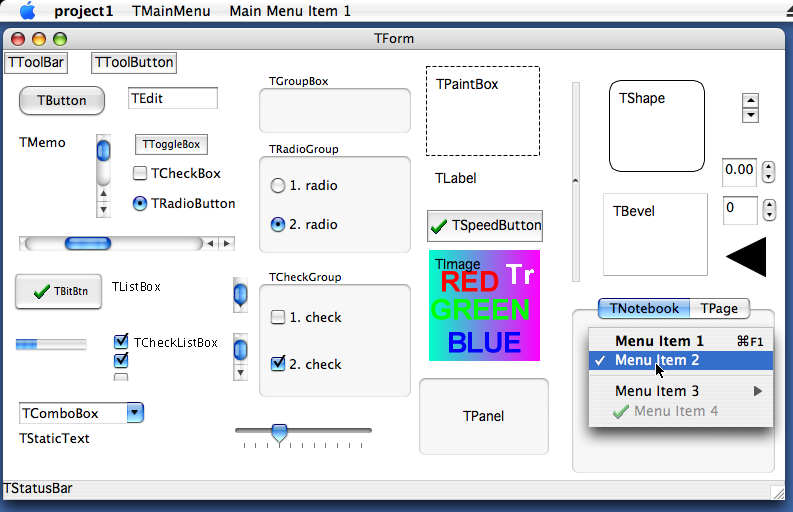
What needs to be done next?
| Item | Note | Dependencies | Responsible |
|---|---|---|---|
| Mouse Capture releasing | |||
| TBrush Patterns | CGPatternCreate | ||
| StretchMaskBlt | Implement: ROP, stretch mode | ||
| TCalendar | no counterpart | ||
| TFontDialog | FPShowHideFontPanel | Tombo | |
| TListView | CreateDataBrowserControl | Tombo | |
| TScrollBox, TCustomControl with scrollbars, TScrollingWinControl | HIScrollViewCreate | Tombo | |
| IDE form designer | kOverlayWindowClass | ||
| TPageSetupDialog | PMSessionPageSetupDialog | ||
| TPrintDialog, TPrinterSetupDialog | PMSessionPrintDialog |
Bugs
| Item | Note | Dependencies | Responsible |
|---|---|---|---|
| TCustomControl - keyboard focus | |||
| TCustomEdit.CharCase | Is ignored when typing text | ||
| TMemo.WordWrap | persistent bug, when word wrap is disabled the memo doesn't scroll to caret | ||
| TMaskEdit | Every typed char is doubled | ||
| TStringGird | Crashes sometimes when userinput is to fast |
Carbon IDE Bugs
| Item | Note | Dependencies | Responsible |
|---|---|---|---|
| Synedit | 1. Font metrics 2. No caret | ||
| Mouse | Wrong position is reported when mouse over component toolbar | ||
| PageControl | no arrows to switch tabs | ||
| ListView | IDE crash in Dialogs with TListView | ||
| Bitmap stretching | Help->About lazarus dialog show image bigger than need | ||
| '...' buttons in dialogs | When button is too small '...' text painted at the bottom of button |
Compatibility issues
Keyboard
- Apple Command key is mapped to ssCtrl per Apple Guidelines
- Apple control key is mapped to ssMeta
- Apple option key is mapped to its inscription, i.e. ssAlt
- Virtual key codes mapping (depends on keyboard language layout!)
- Shortcuts indication (ampersand)
Drawing on canvas outside OnPaint event
- won't be implemented
Drawing on screen device context
- won't be implemented
TControl.Color
- background of Carbon controls is transparent
How to add a new control
For example TButton.
TButton is defined in lcl/buttons.pp. This is the platform independent part of the LCL, which is used by the normal LCL programmer.
Its widgetset class is in lcl/widgetset/wsbuttons.pp. This is the platform independent base for all widgetsets (carbon, gtk, win32, ...).
Its Carbon interface class is in lcl/interfaces/carbon/carbonwsbuttons.pp:
 TCarbonWSButton = class(TWSButton)
 private
 protected
 public
   class function  CreateHandle(const AWinControl: TWinControl; const AParams: TCreateParams): TLCLIntfHandle; override;
 end;
Every WS class that actually implements something must be registered. See the initialization section at the end of the carbonwsXXX.pp unit:
RegisterWSComponent(TCustomButton, TCarbonWSButton);TCarbonWSButton overrides CreateHandle to create a Carbon button helper class called TCarbonButton in carbonprivate.pp, which really creates the button control in the Carbon and installs event handlers.