

Via SVN
Obtenir SVN
Vous devez télécharger un client SVN pour Windows à http://tortoisesvn.tigris.org/ Un client SVN en ligne de commande est disponible à partir du site officiel de SVN pour plusieurs plateformes incluant Linux et Windows.
Utiliser SVN
En utilisant la ligne de commande
Pour obtenir Lazarus la première fois :
Ouvrez un terminal/console texte, allez au dossier dans lequel vous voulez que que le dossier Lazarus soit créé et tapez :
svn co http://svn.freepascal.org/svn/lazarus/trunk lazarus(Parfois, vous devez spécifier le numéro de port : svn co http://svn.freepascal.org:8080/svn/lazarus/trunk lazarus )
Pour mettre à jour les sources Lazarus :
Ouvrez un terminal/console texte, allez au dossier dans lequel vous avez Lazarus et tapez :
svn updateEn utilisant TortoiseSVN pour Windows
TortoiseSVN s'intègre dans l'explorateur Windows. Après installation, toutes les commandes sont utilisables à partir de l'explorateur Windows par un clic droit sur un dossier ou fichier.
Pour obtenir Lazarus la première fois :
- Ouvrir l'explorateur Windows
- Créer un répertoire dans lequel vous voulez mettre les fichiers du serveur SVN
- clic droit sur le nouveau dossier créé
- Sélectionner SVN Checkout... du menu surgissant
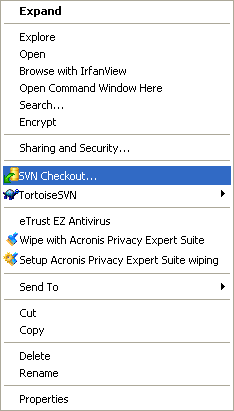
- Dans la prochaine fenêtre de dialogue, vous entrez l'URL du serveur de sources Lazarus :
http://svn.freepascal.org/svn/lazarus/trunk- Regardez comment TortoiseSVN importe l'arborescence des fichiers à partir du serveur. Cela peut prendre du temps pour terminer.
Pour metre à jour les sources Lazarus :
- Ouvrir l'explorateur Windows
- Clic droit sur le dossier source
- Sélectionner SVN Update du menu surgissant
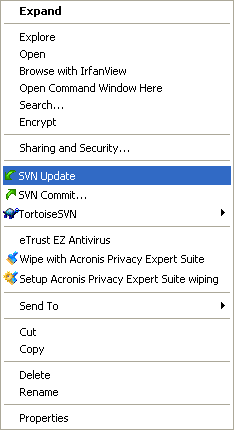
Tip: There seems to be a resource hog bug somewhere in TortoiseSVN (1.24). After you've finished with TortoiseSVN and closed Windows Explorer, it may help to kill process TSVNCache.exe from Task Manager. --Prognatus 18:28, 26 Sep 2005 (CEST)
Scripts
Lightning: Here is a windows batch script that takes care of checking out and updating Lazarus from SVN to a subdirectory and even basic error fixing, because i have no way of knowing where Lazarus is installed it cannot compile or copy the files to your working Lazarus instalation. Please save the script as getlaz.bat or some other name, however there is no warranty of any kind, use at your own risk, put it in a test directory first and make sure there is no subdirectory already called lazarus.
@REM Script for checkout and update Lazarus from SVN
@echo.
@REM Check if lazarus directory exists to update or checkout first
@if not exist lazarus goto CheckoutLaz
@echo Updating Lazarus, please wait ...
@cd lazarus
svn update
@if not %errorlevel% == 0 goto CleanupLaz
@cd..
@goto Exit:CheckoutLaz
@echo Checking out Lazarus for the first time, this might take a while ...
svn checkout http://svn.freepascal.org/svn/lazarus/trunk lazarus
@goto Exit:CleanupLaz
@echo.
@echo Something went wrong, trying to fix any problems if possible ...
svn cleanup
@if not %errorlevel% == 0 goto CleanupFailedLaz
@cd..
@echo.
@echo Cleanup complete please run the script again.
goto Exit
:CleanupFailedLaz
@cd..
@echo.
@echo Cleanup Failed ! Please check or delete/move/rename the lazarus subdirectory ...:ExitMatthijs: In Linux I use a script (it is not very sophisticated, but does the trick) to download the latest SVN-version for Lazarus. Before I copy it here I'll explain my system. In my home-directory I have a special cvsroot-directory. In this directory I have a script for downloading Lazarus and other interesting projects. Lazarus is installed in /usr/share/lazarus. Before building a new version from SVN I make a backup, just in case the current svn is unstable. This is done by moving the /usr/share/lazarus directory to /usr/share/lazarus.bu To adapt the script to your system you only need to alter the constants defined at the start of the script. But without further ado, here is the script. But (big but) it is given without any guarantee. :) If things break you are on your own.
#!/bin/bash# before you can use this script you have to checkout all files
# so first do a
# svn checkout http://svn.freepascal.org/svn/lazarus/trunk lazarus#Define some directories
BASEDIR=/usr/share/
LAZCVSDIR=~/cvsroot/lazarus/
LAZDIR=/usr/share/lazarus/
LAZBACKUP=/usr/share/lazarus.bu#Remove old backup if it exists
date +"%T %tStart"
if [ -d $LAZBACKUP ]
then
date +"%T %tRemoving old backup"
rm $LAZBACKUP -fr
else
date +"%T %tNo backup to remove"
fidate +"%T %tCreating copy of lazarus dir"
cp -R $LAZDIR $LAZBACKUP#Getting stuff from svn
date +"%T %tUpdate lazarus"
svn update lazarus > ~/cvs_update.log#Copying cvs-files to our laz dir.
date +"%T %tcopying files"
cp -Rf $LAZCVSDIR $BASEDIR --reply=yes#Make and building of lazarus
date +"%T %tmake lazarus"
cd $LAZDIR
make > /dev/null
date +"%T %tmake the packages"
make idepkg > /dev/null
date +"%T %tFinished"Installing the compiler
If you are starting from scratch with the above, you won't have the FPC compiler installed. In other words the compiler is not included in the Lazarus SVN. It is possible to use a SVN version of FPC also, but generally it is better to use the latest stable release (at this moment v2.0.2). In my opinion it is preferable to try to rebuild the directory structure of a standard Lazarus install. Here is how I installed it (on WinXP):
- Download the binary for your system for this page: http://www.freepascal.org/download.html.
- Also download the source code from the same page.
- Install the binaries by running a 'full install' and accepting all defaults.
- From the installed directory (c:\fpc\2.0.2\), copy the complete 'pp' directory to your base Lazarus directory (eg. c:\lazarus\).
- Create a new directory 'fpcsrc' in your base Lazarus directory (c:\lazarus\fpcsrc\).
- Unpack the source files to some directory (eg. c:\fpc\2.0.2\src).
- Browse into this directory and find the directories 'fcl', 'rtl' and 'packages'. Copy these directories to the newly created directory 'fpcsrc'.
- If you want, you can now delete the fpc sources and uninstall the fpc binaries.
- Make sure the new path to the ppc386 executable is in your environment.
Note: I'm not sure what the fpc.cfg file contains when you start from scratch. I think there are differences between de fpc.cfg of fpc itself and the one of Lazarus. --Jouke 12:15, 13 Mar 2006 (CET)
Daily Snapshot method
If you don't want to use svn directly, a daily snapshot of the current svn is available from the lazarus snapshot site or one of its mirrors.
Downloading releases
Binary releases for various platforms are also available via the Lazarus Sourceforge download area.
Original contributors and changes
This page has been converted from the epikwiki version.