

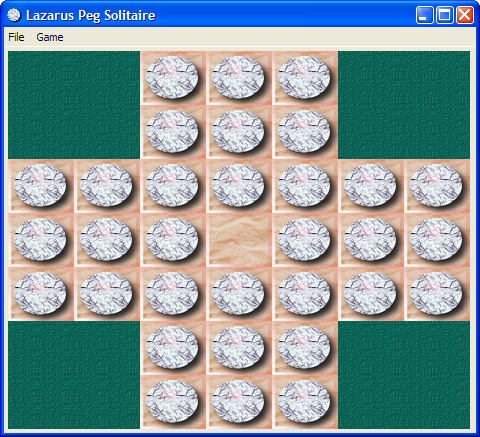
This tutorial is the second Lazarus tutorial that aims at introducing the basics of Lazarus application development. It's best to start this tutorial after having finished the first one (Howdy_World_(Hello_World_on_steroids)). This tutorial exlpains a bit about how to work with graphics and how to make a program modular. The final product of this tutorial is a basic but working version of the Peg Solitaire game (http://en.wikipedia.org/wiki/Peg_solitaire). If all goes well in the end it will look something like this:
Start the project
As mentioned in the previous tutorial it's best to start with a clean, separate directory for each project. A quick recap:
- Create a new directory for this game.
- Start a new Application (Project/New Project... and select Application).
- In the project options insert bin\ in front of the target filename.
- Save the project as PegSolitaire.
- Save the main form as ufrmMain.
- In the object inspector change the form's name to frmMain.
- Change the caption to Lazarus Peg Solitaire.
And extra for this project:
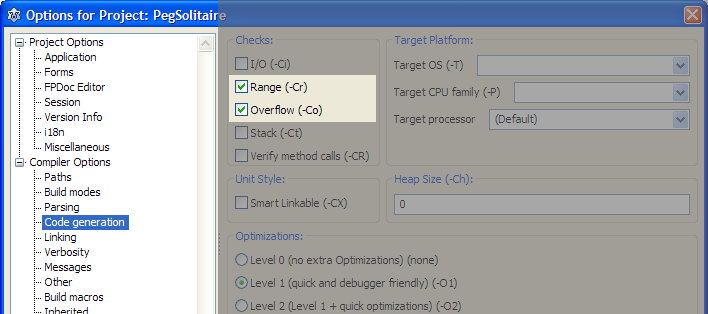
- Open the project options dialog (Shift-Ctrl-F11).
- Select Compiler Options/Code Generation.
- Enable Range checking and Overflow error checking (see image belows).
First steps
It's always a good idea to seperate gui related code from data structure definitions. So the first step will be the creation of a separate unit for our Solitaire data structures.
- From the menu choose File/New Unit....
- Save the unit as PegDatastructures (and press the lowercase button that pops up).
The basic elements of a Peg Solitaire board are the marbles, the board structure and the empy places. We'll simulate this by a simple matrix that has cells of a certain type (empty, occupied and not accessible). And we'll encapsulate all this in a class that handles all the data manipulation.
- Add the following code to the PegDatastructures unit.
<Delphi>const
C_MAX = 7; // Max board size: 7x7type
 TCellNums = 1..C_MAX;
 TCellType = (ctNoAccess, ctEmpty, ctPeg);
 TPegCells = array[TCellNums, TCellNums] of TCellType;
TPegSolitaire = class
private
Size: TCellNums;
PegCells: TPegCells; public
constructor Create(const pSize: TCellNums);
end;</Delphi>It's fair to assume that other code that is going to use this class needs access to the cells contents (i.e. PegCells). The way to handle this is either by defining a set of functions to access the cells or define a so called array property. Let's go for the latter approach and add the following line to the public section of the TPegSolitaire class: <Delphi>property Cell[const pRow, pCol: TCellNums]: TCellType;</Delphi>
- Position the text cursor on the constructor line.
- Press Ctrl-Shift-C: the IDE generates the constructor body (as we expected) but it also generates the empty bodies for the 2 methods that give us access to PegCells via the Cells property.
- GetCell retrieves data from the private variable PegCells. Add the following code to the function:
<Delphi>result := PegCells[pRow,pCol]</Delphi>
- SetCell populates the PegCells array with data. Add the following code to the procedure:
<Delphi>PegCells[pRow,pCol] := pValue</Delphi>
- And now finalize the Create constructor. Add this code to it's body:
<Delphi>var iRow,iCol: integer; begin
 // Store the size of the board locally
 Size := pSize;
// Initialize all cells to 'not accessible'
for iRow := 1 to C_MAX do
for iCol := 1 to C_MAX do
Cell[iRow,iCol] := ctNoAccess;</Delphi>Now that the basic data structure is in place, let's have a look at the graphics we are going to need. There are many ways to display a soliatire board. We are going to use a paintbox. That will give us full control over the graphic features that Lazarus gives us out of the box.
Our main form is going to use the data structure we defined in the PegDatastructure file.
- Add PegDatastructures it to the uses list at the top of the file:
<Delphi>uses
 PegDatastructures,
Classes, SysUtils, FileUtil, Forms, Controls, Graphics, Dialogs;</Delphi>- Open the main form's sourcefile.
- Add