

Stabilné verzie
Zo SourceForge
Binárne uvoľnenia pre rôzne platformy sú dostupné prostredníctvom oblasti Lazarus Sourceforge download.
Získanie Lazarus z nášho úložiska Ubuntu
Na www.hu.freepascal.org sídli úložisko Ubuntu s balíčkami Lazarus a FPC vo forme *.deb.
Pridanie kľúča
Stiahnite kľúž z verejného key servera:
gpg --keyserver hkp://pgp.mit.edu:11371 --recv-keys 6A11800FPridajte ho do systému apt:
gpg --export 6A11800F | sudo apt-key add -Môžete si pozrieť zoznam apt kľúčov pomocou:
sudo apt-key listPridanie úložiska
Môžete použiť synaptic alebo priamo upraviť /etc/apt/sources.list. Pre stabilné (stable) úložisko, pridajte riadok:
deb http://www.hu.freepascal.org/lazarus/ lazarus-stable universePre testovacie úložisko:
deb http://www.hu.freepascal.org/lazarus/ lazarus-testing universeInštalácia
Teraz môžete nainštalovať Lazarus pomocou apt:
apt-get install lazarusVývojové verzie z SVN
Získanie SVN
Môžete si stiahnuť SVN klienta pre Windows na tortoisesvn.tigris.org. SVN klient príkazového riadku je dostupný na oficiálnej webovej stránke SVN pre voaceré platformy.
Na Linuxe je doporučené použiť balíčkovací systém vašej distribúcie pre nainštalovanie subversion.
Použitie SVN
V príkazovom riadku
Pre prvotné stiahnutie Lazarus:
Otvorte terminal/príkazový riadok, zmeňte adresár, v ktorom chcete mať vytvorený adresár Lazarus a zadajte:
svn co http://svn.freepascal.org/svn/lazarus/trunk lazarusPre aktualizáciou zdrojov:
Otvorte terminal/príkazový riadok, presuňte sa do adresára lazarus a zadajte:
svn updateAlternatívne URL
Niekedy vyššie udaná URL úložiska nepracuje, pretože medzi SVN serverom a Vami je http-proxy server, ktorý zvyčajne funguje ako 'transparent' proxy, ale stále neposiela Vaše SVN príkazy správne na server svn.freepascal.org.
Server svn.freepascal.org počúva aj na porte 8080. Možno proxy nebude zasahovať do HTTP prevádzky na tomto porte, tak môžete skúsiť:
svn co http://svn.freepascal.org:8080/svn/lazarus/trunk lazarus SVN úložisko Lazarus je zrkadlené na SourceForge s oneskorením 15 minút pomocou fpsvnsync. Úložisko SourceForge používa protokol HTTPS. Proxy servery zvyčajne nezasahujú do tohoto protokolu. Môžete skúsiť túto formu zadaním nasledujúceho príkazu
svn co https://svn.sourceforge.net/svnroot/lazarus/trunk lazarusAk vlastníte proxy server, ale sa priatelíte o správcom, tu nájdete detaily nastavenia proxy pre posielanie SVN príkazov, vrátane príkladu pre squid. Nezabudnite nastaviť klienta na používanie proxy! (pre TortoiseSVN, viz Settings/Network).
Používanie TortoiseSVN pre Windows
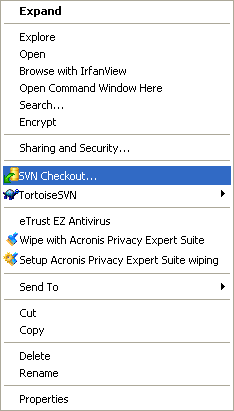
TortoiseSVN sa integruje do Prieskumníka Windows, takže po inštalácii sú všetky príkazy dostupné z Prieskumníka Windows pomocou kliknutia pravým tlačítkom na adresár alebo súbor.
Pre prvotné stiahnutie Lazarus:
- Otvoriť Prieskumníka Windows
- Vytvoriť adresár, do ktorého chcete umiestniť súbory zo servera SVN
- Kliknúť pravým tlačítkom na novovytvorený adresár
- Zvoliť SVN Checkout... z vyskakovacieho menu
- V nasledujúcom dialógu zadajte URL servera so zdrojovým kódom Lazarus:
http://svn.freepascal.org/svn/lazarus/trunk- Počkať kým TortoiseSVN importuje spborový strom zo servera, to môže trvať dlhšie.
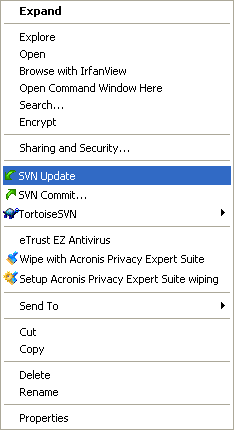
Pre aktualizáciu zdrojových kódov Lazarus:
- Otvoriť Prieskumníka Windows
- Kliknúť pravým tlačítkom na novovytvorený adresár
- Zvoliť SVN Update vo vyskakovacom menu
Scripts
Lightning: Here is a windows batch script that takes care of checking out and updating Lazarus from SVN to a subdirectory and even basic error fixing, because i have no way of knowing where Lazarus is installed it cannot compile or copy the files to your working Lazarus instalation. Please save the script as getlaz.bat or some other name, however there is no warranty of any kind, use at your own risk, put it in a test directory first and make sure there is no subdirectory already called lazarus.
@echo off
REM Script for checkout and update Lazarus from SVN
echo.
REM Check if lazarus directory exists to update or checkout first
if exist lazarus (
echo Updating Lazarus, please wait ...
cd lazarus
svn update
if %errorlevel% NEQ 0 goto CleanupLaz
cd ..
goto Exit
)echo Checking out Lazarus for the first time, this might take a while ...
svn checkout http://svn.freepascal.org/svn/lazarus/trunk lazarus
goto Exit:CleanupLaz
echo.
echo Something went wrong, trying to fix any problems if possible ...
svn cleanup
if %errorlevel% NEQ 0 (
cd ..
echo.
echo Cleanup Failed ! Please check or delete/move/rename the lazarus subdirectory ...
goto Exit
)cd ..
echo.
echo Cleanup complete please run the script again.
:ExitMatthijs: In Linux I use a script (it is not very sophisticated, but does the trick) to download the latest SVN-version for Lazarus. Before I copy it here I'll explain my system. In my home-directory I have a special cvsroot-directory. In this directory I have a script for downloading Lazarus and other interesting projects. Lazarus is installed in /usr/share/lazarus. Before building a new version from SVN I make a backup, just in case the current svn is unstable. This is done by moving the /usr/share/lazarus directory to /usr/share/lazarus.bu To adapt the script to your system you only need to alter the constants defined at the start of the script. But without further ado, here is the script. But (big but) it is given without any guarantee. :) If things break you are on your own.
#!/bin/bash# before you can use this script you have to checkout all files
# so first do a
# svn checkout http://svn.freepascal.org/svn/lazarus/trunk lazarus#Define some directories
BASEDIR=/usr/share/
LAZCVSDIR=~/cvsroot/lazarus/
LAZDIR=/usr/share/lazarus/
LAZBACKUP=/usr/share/lazarus.bu#Remove old backup if it exists
date +"%T %tStart"
if [ -d $LAZBACKUP ]
then
date +"%T %tRemoving old backup"
rm $LAZBACKUP -fr
else
date +"%T %tNo backup to remove"
fidate +"%T %tCreating copy of lazarus dir"
cp -R $LAZDIR $LAZBACKUP#Getting stuff from svn
date +"%T %tUpdate lazarus"
svn update lazarus > ~/cvs_update.log#Copying cvs-files to our laz dir.
date +"%T %tcopying files"
cp -Rf $LAZCVSDIR $BASEDIR --reply=yes#Make and building of lazarus
date +"%T %tmake lazarus"
cd $LAZDIR
make > /dev/null
date +"%T %tmake the packages"
make idepkg > /dev/null
date +"%T %tFinished"Installing the compiler
Jouke: If you are starting from scratch with the above, you won't have the FPC compiler installed. In other words the compiler is not included in the Lazarus SVN. It is possible to use a SVN version of FPC also, but generally it is better to use the latest stable release (at this moment v2.0.4). In my opinion it is preferable to try to rebuild the directory structure of a standard Lazarus install. Here is how I installed it (on WinXP):
- Download the binary for your system from this page: http://www.freepascal.org/download.html.
- Also download the source code from the same page.
- Install the binaries by running a 'full install' and accepting all defaults.
- Unpack the source files to the same directory as the binaries (c:\fpc\2.0.4\).
- In your base Lazarus directory, create two new directories: 'pp' and 'fpcsrc'.
- From the fpc directory c:\fpc\2.0.4\, select the directories 'bin, 'msg' and 'units' and copy them completely into the 'pp' directory you just created.
- From the fpc source directory c:\fpc\2.0.4\fpc\, select the directories 'fcl', 'rtl' and 'packages'. Copy these three directories to the directory 'fpcsrc'.
- While leaving out all directories which were already there and also leaving out the underlying directories, the Lazarus tree should now look like this:
  C:\Lazarus\pp\bin
               \msg
               \units
            \fpcsrc\fcl
                   \packages
\rtl- If you want, you can now delete the fpc sources and uninstall the fpc binaries.
- Make sure the new path to the ppc386 executable is in your environment.
- From the C:\lazarus\tools\install\win32 directory copy the file 'samplefpc.cfg' to the C:\lazarus\pp\bin\i386-win32 directory and rename it to fpc.cfg (first delete/rename the old fpc version).
- Edit this file and replace all occurencies of '$1' by 'C:\lazarus\pp'.
That's it. You should now be able to make Lazarus and start using it!
Daily Snapshot method
If you don't want to use svn directly, you can try a daily snapshot. For a list of mirrors see the Lazarus Snapshots Downloads page.
Browse the Source Repository with a Web Browser
The contents of the SVN archive can also be browsed with your web-browser through this viewcvs interface.
Lazarus Distributions
There are some unofficial sites where you can find Lazarus and Free Pascal too:
- You can get a Ubuntu LiveCD from Austrian University of Applied Sciences hosting
http://www.sigma-server.com/liveCD/Ubuntu-7.10-NTC-Lazarus.iso and md5sum file is here http://www.sigma-server.com/liveCD/Ubuntu-7.10-NTC-Lazarus.iso.md5.
Original contributors and changes
This page has been converted from the epikwiki version.