

External tools are global, not project specific
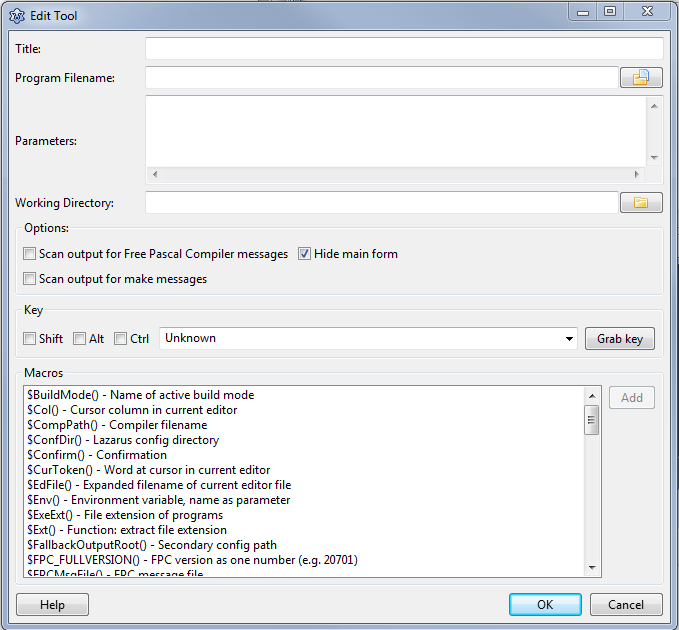
Title
editThis name is is shown in the IDE menu.
Program Filename
editThe full path to the tool. For example:
/usr/bin/ppc386Parameters
editThe command line parameters. For example:
-l test.pasWorking Directory
editThe directory, where to start the tool. All relative paths will be relative to this.
Options
editScan output for FPC messages
editParse the output for FPC messages and jump to errors.
Show console
editOnly available on MS Windows. Creates a console. Default is false. Since 1.7.
Hide window
editOnly available on MS Windows. Do not show the application window. Default is true. Since 1.7.
Scan output for make messages
editParse the output for make messages and jump to errors.
Key
editDefine the shortcut for this tool. This is optional.
Macros
editYou can use macros in the programfilename, the parameters and the working directory.
See IDE Macros in paths and filenames.
Examples
editRun cmd.exe
editChoose <Tools><Configure External Tools> from the lazarus main menu and setup the following.
- Title: cmd.exe
- Program Filename: C:\windows\system32\cmd.exe
- Working Directory: $(ProjPath)
- Disable all scanners
- Show console: enable
- Hide window: disable
Run Tortoisesvn to checkout or update your local svn repository
editAdd a function to checkout svn sources from the repository. This example shows how to do this if you are on windows and have tortoisesvn installed. First create a batch-file in the folder lazarus\tools. (e.g lazarus\tools\checkout_lazarus_win.bat)
tortoiseproc /command:checkout /url:"http://svn.freepascal.org/svn/lazarus/trunk/" /path:"..\"
Then choose <Tools><Configure External Tools> from the lazarus main menu and setup the following.
- Title: Checkout Lazarus
- Program Filename: $LazarusDir()\tools\checkout_lazarus_win.bat
- Working Directory: $LazarusDir()\tools\
If you want to add an additional function to update the Lazarus sources from repository, then you can create another batch-file with the following content.
tortoiseproc /command:update /path:"..\"