


This article applies to macOS only.
See also: Multiplatform Programming Guide

This article applies to iOS only.
See also: Multiplatform Programming Guide
Introduction
This page gives an overview of the LCL Carbon interface for Mac OS X and will help new developers.
For installation and creating a first Carbon application refer to Carbon Interface.
Other Interfaces
- Lazarus known issues (things that will never be fixed) - A list of interface compatibility issues
- Win32/64 Interface - The Windows API (formerly Win32 API) interface for Windows 2000/XP/Vista/10, but not CE
- Windows CE Interface - For Pocket PC and Smartphones
- Carbon Interface - The Carbon 32 bit interface for macOS (deprecated; removed from macOS 10.15)
- Cocoa Interface - The Cocoa 64 bit interface for macOS
- Qt Interface - The Qt4 interface for Unixes, macOS, Windows, and Linux-based PDAs
- Qt5 Interface - The Qt5 interface for Unixes, macOS, Windows, and Linux-based PDAs
- GTK1 Interface - The gtk1 interface for Unixes, macOS (X11), Windows
- GTK2 Interface - The gtk2 interface for Unixes, macOS (X11), Windows
- GTK3 Interface - The gtk3 interface for Unixes, macOS (X11), Windows
- fpGUI Interface - Based on the fpGUI library, which is a cross-platform toolkit completely written in Object Pascal
- Custom Drawn Interface - A cross-platform LCL backend written completely in Object Pascal inside Lazarus. The Lazarus interface to Android.
Platform specific Tips
- Android Programming - For Android smartphones and tablets
- iPhone/iPod development - About using Objective Pascal to develop iOS applications
- FreeBSD Programming Tips - FreeBSD programming tips
- Linux Programming Tips - How to execute particular programming tasks in Linux
- macOS Programming Tips - Lazarus tips, useful tools, Unix commands, and more...
- WinCE Programming Tips - Using the telephone API, sending SMSes, and more...
- Windows Programming Tips - Desktop Windows programming tips
Interface Development Articles
- Carbon interface internals - If you want to help improving the Carbon interface
- Windows CE Development Notes - For Pocket PC and Smartphones
- Adding a new interface - How to add a new widget set interface
- LCL Defines - Choosing the right options to recompile LCL
- LCL Internals - Some info about the inner workings of the LCL
- Cocoa Internals - Some info about the inner workings of the Cocoa widgetset
Documentation about Carbon
- Free Pascal's Carbon API unit is FPCMacOSAll.pas in /usr/local/share/fpcsrc/packages/extra/univint.
Carbon interface development basics
- Target Mac OS X version is 10.4
- Avoid using obsolete or deprecated APIs and functions (e. g. QuickDraw vs. Quartz 2D)
- Use object approach
- Check Carbon calls result with OSError function
- Assume UTF-8 encoded strings between LCL and Carbon widgetset (for future Lazarus Unicode support)
What is already working ?
- Features - see Roadmap#Status_of_features_on_each_widgetset
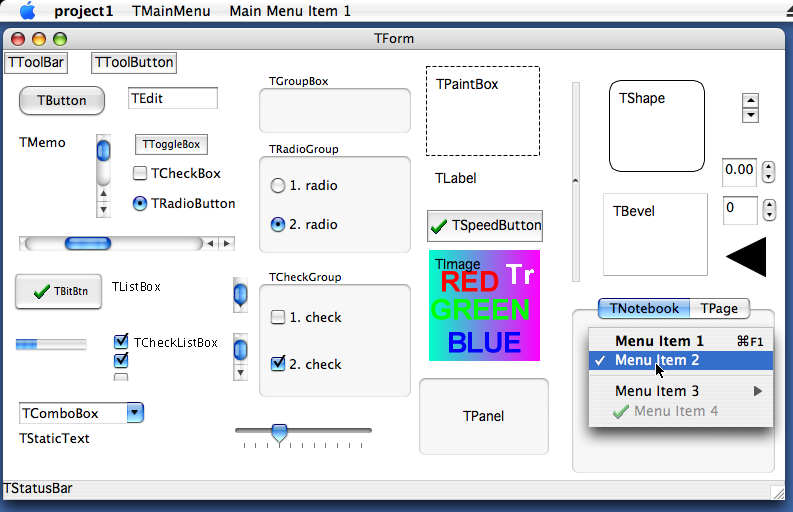
- Forms and controls - see Roadmap#Status_of_components_on_each_widgetset
- Creating TOpenGLControl with AGL context (see components/opengl/)
- Mouse events
- Keyboard events
What needs to be done next?
See Bug Tracker Carbon open issues
Carbon IDE Bugs
| Item | Note | Dependencies | Responsible |
|---|---|---|---|
| '...' buttons in dialogs | Now they are too large I think | ||
| OK/Cancel | Many dialogs have non-Mac check-X glyphs | ||
| Menu bar | Too wide for 1024x768 display resolution | ||
| Lazarus menu | Help About and app prefs (Environment options) should be accessible here | ||
| Menus | Many missing or non-standard menu shortcuts: File New should be Cmd+N File Save As should be Shift+Cmd+S File Quit should be Cmd+Q Search Find should be Cmd+F Search Find Next should be Cmd+G Search Find Previous should be Shift+Cmd+G (Goto line and Procedure List need to be reassigned) Option+Cmd+F does not bring up Search Results F11 behaves weird! |
See Bug Tracker Carbon IDE open issues
Implementation Details
Keyboard
- Apple Command key is mapped to ssCtrl per Apple Guidelines
- Apple Control key is mapped to ssMeta
- Apple Option key is mapped to its inscription, i.e. ssAlt
- Virtual key codes mapping is not reliable (depends on keyboard language layout!)
Application
- Title: You cannot change it at runtime. You have to set it in Application Bundle.
- OnDropFiles event is fired when file is dropped on application dock icon or opened via Finder if is associated. You have to enable this event in Application Bundle.
Drawing and measuring text precisely in parts
If you want to draw (via TextOut, TextRect) or measure (via TextWidth, TextHeight) text divided into various parts and rely it will be displayed same each time not depending on its division, you have to disable some default typographic features (like kerning, fractional positioning, ...) of Canvas. You can choose one of the following:
- CarbonWidgetSet.SetTextFractional(Canvas, False); // from CarbonInt unit
- TCarbonCustomControl(CustomControl.Handle).TextFractional := False; // from CarbonPrivate unit
- TCarbonDeviceContext(Canvas.Handle)..TextFractional := False; // from CarbonCanvas unit
Compatibility issues
These are things that will probably never be solved.
Mouse.CursorPos changing does not generate mouse (move) events
Release mouse capture is not supported
Command line parameters
Because Carbon applications are executed via Application Bundle, command line parameters are not passed. You have to use OnDropFiles event to detect openning associated files.
Shortcuts indication is not supported
Drawing on Canvas outside OnPaint event is not supported
Drawing on screen device context is not supported
TCustomControl.Color of clBtnFace makes its background transparent
TWinControl.Font fsStrikeOut is not supported
TForm
- Icon is not supported
- ShowInTaskbar is not supported
TEdit.PasswordChar different then default is not supported
TMemo.WordWrap when is disabled, does not allow to scroll text horizontally
TListBox.Columns is not supported
TComboBox
- OnDropDown is called when set focus
- OnCloseUp is called when released focus
- DroppedDown does not show drop down list when style is csDropDownList
- DropDownCount is not supported
- Style: csSimple, csOwnerDrawFixed and csOwnerDrawVariable are not supported
TPanel.Bevelxxx: bvLowered and bvSpace are not supported
TBitBtn.Spacing is not supported
TTrackBar
- LineSize is not supported
- ScalePos is not supported
- TickMarks are not supported
TProgressBar
- BarShowText is not supported
- Smooth is not supported
- Step is not supported
TColorDialog.Title is not supported
How to add a new control
For example TButton.
TButton is defined in lcl/buttons.pp. This is the platform independent part of the LCL, which is used by the normal LCL programmer.
Its widgetset class is in lcl/widgetset/wsbuttons.pp. This is the platform independent base for all widgetsets (carbon, gtk, win32, ...).
Its Carbon interface class is in lcl/interfaces/carbon/carbonwsbuttons.pp:
 TCarbonWSButton = class(TWSButton)
 private
 protected
 public
   class function  CreateHandle(const AWinControl: TWinControl; const AParams: TCreateParams): TLCLIntfHandle; override;
 end;
Every WS class that actually implements something must be registered. See the initialization section at the end of the carbonwsXXX.pp unit:
RegisterWSComponent(TCustomButton, TCarbonWSButton);TCarbonWSButton overrides CreateHandle to create a Carbon button helper class called TCarbonButton in carbonprivate.pp, which really creates the button control in the Carbon and installs event handlers.