

The TTimeEdit  component is a control that assists in picking a correct time.
TTimeEdit is found on the the Misc tab of the Component Palette.
Usage
editTime selection
editThe time can be entered either manually or by clicking on hours and minutes in a time-selection popup window. The latter is activated by clicking on the "time" icon of the component. The fastest way to enter a time in the popup this is to single-click on the hour and then to double click on the minutes of the required time (or reverse, the double-click closes the form). The minutes are displayed in the popup in 5-minute intervals, but you can also expand the list to 1-minute intervals by clicking on the '>>' button.
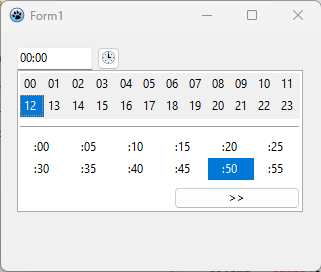
Time format
editBy default, the time is displayed as specified in the parameters of the DefaultFormatSettings record (ShortDateFormat).
However, specific properties are available when the user requires a different formatting:
TimeFormat(string): This format string replaces theDefaultFormatSettings.ShortDateFormat. Basically, it can contain- one or two
'h'characters for the hours, - one or two
'n'or'm'characters for the minutes, - one or two
's'characters for the seconds, - up to three
'z'chacters for the microseconds (separated by a period, '.') - colons to separate the hour, minute and second parts
- An appended
'am/pm','a/p', or'ampm'switches from 24 to 12 hour mode (case-insensitive). - Any other text is allowed, but it must be double-quoted.
- one or two
TimeSeparator(char): replaces the colons in theTimeFormatstringTimeAMString(string): replaces the appended "AM" in 12 hour mode, but only when that is indicated by the "ampm" symbol in theTimeFormatstring.TimePMString(string): dto for the "PM" part.
Examples and output for the time 8:12:27 and 5 milliseconds
'h:n'             --> '8:12'
'hh:nn:ss'        --> '08:12:27'
'hh:nn.ss.z       --> '08:12:27.5'    // may lead to confusion, the next example is better
'hh:nn.ss.zzz     --> '08:12:27:005'
'hh:nn AM/PM'     --> '08:12 AM'
'hh:nn A/P'       --> '08:12 A'
'hh:nn AMPM'      --> '08:12 vorm'    // assuming that TimeAMString is 'vorm'
'h" hrs "m" mins' --> '8 hrs 12 mins'