

This documentation is not intended to be fully comprehensive, but it should be enough to get a beginner started on the use of the component.

 TShellListView is available under the Misc tab of the Component Palette. It displays a list of the files found in the directory identified by the
Root property which contains the full path from the drive letter to the corresponding directory. By default, only files are listed, but by means of the ObjectTypes property the list can be extended to include also folders and hidden files.
If you need the full path to any listview item, call the method GetPathFromItem(Item: TListitem), or append the node's Caption to the Root value (but make sure to have a path delimiter ('\' in Windows, '/' in Unix/Linux/macOS) between them by calling the IncludeTrailingPathDelimiter function).
Example of getting the full path to the selected node:
var
  pathName: String;
...
  pathName := ShellListView1.GetPathFromItem(ShellListView1.Selected);
  // or
  pathName := IncludeTrailingPathDelimiter(ShellListView1.Root) + ShellListView1.Selected.Caption;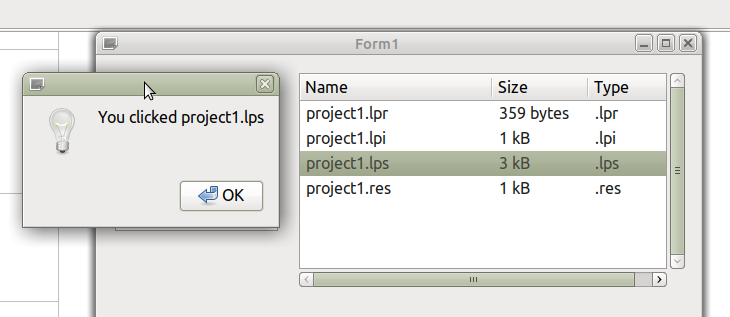
Linking to TShellTreeView
There is little coding to do in getting TShellListView to communicate with TShellTreeView. In the Object Inspector for TShellTreeView, set the property ShellListView to the name of your TShellListView object. This ought to be already stored on a dropdown menu if both TShellListView and TShellTreeView objects are deployed on your form. For completeness, so that both objects respond to each other, set the ShellTreeView property of TShellListView to the name of your TShellTreeView object.
Alternatively, if we let svList be the TShellListView object, and svTree be the TShellTreeView object, then these properties can be set programmatically:
  svList.ShellTreeView := svTree;
  svTree.ShellListView := svList;
The result is to invoke Explorer-like behavior in their responsiveness: When a directory is selected in the treeview the listview automatically adapts its Root value and displays the files contained in this directory.
Opening documents
The easiest way to open, for example, the selected file is to envoke the OpenDocument(pathName) command. pathname is a string containing the full path to the selected item in the listview which you can obtain as shown earlier.Remember to add unit lclintf to the uses clause so that the OpenDocument command can be found.
Displaying icons
In Windows icons are displayed in front of each listview item automatically, the icons are provided directly by the operating system. In the unix-like operating systems, this is has not yet been implemented, so far. But you can drop a TImageList to the form and link it to the SmallImages property of the ShellListView. Add typical 16x16 file and folder icons to the imagelist. If you want to switch the ViewStyle to vsIcon you need an additional imagelist with the same images at the same list indices, but at a size of 32x32 pixels, now linked to the LargeImages property. Write a handler for the OnFileAdded event and assign the corresponding image index to the added node. In the following example, it is assumed that the imagelist contains a folder and a document icon at indices 0 and 1, respectively, and the OnFileAdded handler is supposed to assign these images to the nodes accordingly. Note that folders can be displayed in a TShellListview by adding otFolders to the ObjectTypes property of the listview:
procedure TForm1.ShellListView1FileAdded(Sender: TObject; Item: TListItem);
begin
  if TShellListItem(Item).IsFolder then
    Item.ImageIndex := 0
  else
    Item.ImageIndex := 1;
end;
Such code is required for Unix/Linux/macOS in order to display icons. If you use such an event handler also in Windows, the imagelist icons will replace the default icons provided by the OS.
Additional columns
As can be seen in above screenshot, TShellListView by default diplays three columns with the name, size and type of each file. In Lazarus v4.99 and newer, however, columns can be added or deleted freely; the kind of displayed information depends on the value of the ColumnID property which can be selected in the Object Inspector:
cidFileName- displays the file name (default)cidSize- displays the size of the file (default)cidType- displays the type (extension) of the file (default)cidAttr- displays the file attributescidDateModified- displays the date/time of the file's last modification.
These are elements can be easily extracted from the file's search record stored in the FileInfo property of each ListItem. If you need to show columns with additional OS-specific elements of the search record or other meta data, select ColumnID = cidCustom, and give the column a unique CustomID (integer). Then write a handler for the OnGetCellText event in which you return the text to be displayed in this particular column cell; use the CustomID property of the Column argument to distinguish which column is requesting this information.
Example: Suppose you want to display a column with the width and height of .jpg files.
- Add a column with
ColumnID=cidCustomandCustomID=1. - Provide a function
GetImageSize(const AFileName: String; out ASize: TPoint): Booleanwhich extracts the image size from the header of a picture file - see fcl-image#Getting_image_size_without_loading_the_image_itself - Write a handler for the
OnGetCellTextevent:
procedure TForm1.ShellListViewCellTextHandler(Sender: TObject;
  AItem: TShellListItem; AColumn: TShellListColumn; var AText: String);
var
  sz: TPoint;
  slv: TShellListView;
begin
  slv := Sender as TShellListView;
  if (AColumn.ColumnID = cidCustom) and (AColumn.CustomID = 1) and (not AItem.IsFolder) and SameText(ExtractFileExt(AItem.FileInfo.Name), '.jpg') then
  begin
    if GetImageSize(slv.GetPathFromItem(AItem), sz) then
      AText := Format('%d x %d', [sz.X, sz.Y]);
  end;
end;